Best CRM for Small and Medium Businesses: A Practical Buyer's Guide
Find the right CRM for your SMB. Compare HubSpot, Pipedrive, Zoho, Freshsales & Monday.com with real pricing, features, and implementation advice for 2026.

If you're running a small or medium business, you're likely managing customer relationships through a chaotic mix of spreadsheets, email inboxes, sticky notes, and sheer memory. You know you need a CRM, but the market is overwhelming—hundreds of options ranging from free to enterprise-priced, each claiming to be perfect for your business.
This guide cuts through the noise. We'll help you understand what actually matters for SMBs, which features justify the investment, and how to choose a CRM that your team will actually use instead of abandoning after three months.
Why SMBs Need a Different Approach to CRM
Enterprise CRM guides focus on customization depth, API capabilities, and advanced workflow automation. That's not your world. As an SMB, you need:
- Quick setup → You can't afford 3-month implementations or dedicated admins
- Intuitive design → Your sales team needs to adopt it immediately, not after weeks of training
- Reasonable pricing → Costs must scale with your growth, not bankrupt you prematurely
- Focused features → You need core functionality that works excellently, not 500 mediocre features
- Mobile accessibility → Your team is often in the field or working remotely
- Integration with tools you already use → Email, calendar, accounting software, marketing tools
The best SMB CRM feels like it disappears into your workflow rather than creating new busywork.
Essential Features Every SMB CRM Must Have
Before we dive into specific recommendations, here are the non-negotiables.
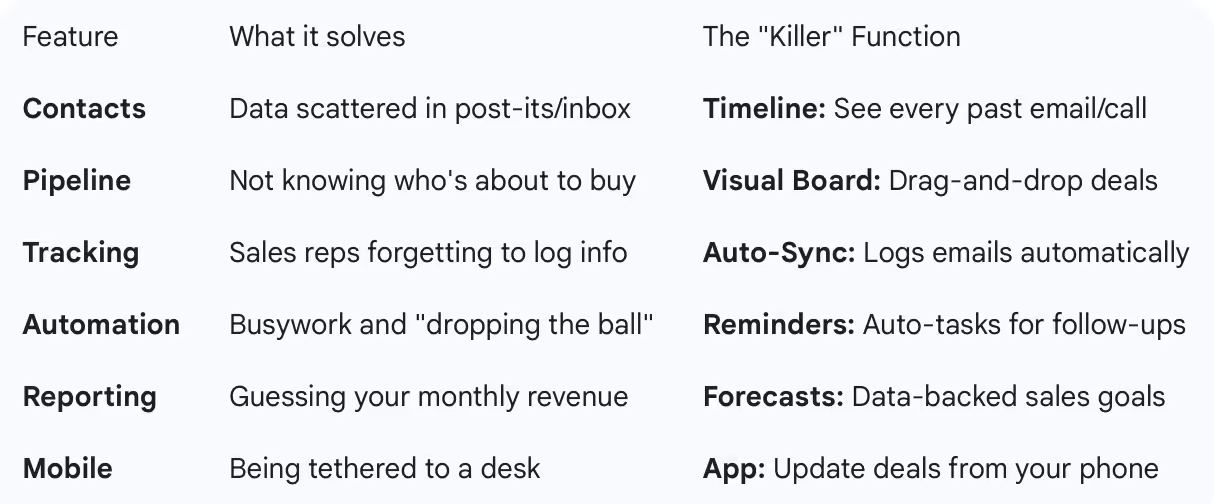
Contact & Company Management
- Centralized database for all customer and prospect information
- Custom fields to track what matters to your business
- Contact history showing every interaction across email, calls, meetings, and support
Pipeline Management
- Visual deal tracking (kanban or list view) so you know where every opportunity stands
- Deal stages that match your actual sales process
- Revenue forecasting based on pipeline data
Communication Tracking
- Email integration that logs conversations automatically (not manual entry)
- Call logging (ideally with dialing directly from the CRM)
- Meeting scheduler that syncs with your calendar
Basic Automation
- Automated task creation (e.g., "create follow-up task 3 days after demo")
- Email sequences for simple outreach
- Lead assignment rules to route inquiries to the right person
Reporting
- Sales activity metrics (calls made, emails sent, meetings booked)
- Pipeline health reports (deal velocity, conversion rates, average deal size)
- Revenue tracking and forecasting
Mobile App
- Full CRM access from iOS and Android
- Ability to update deals, log activities, and access contacts on the go
Top CRM Recommendations for Small & Medium Businesses
1. HubSpot CRM — Best Free Option & All-Around Winner
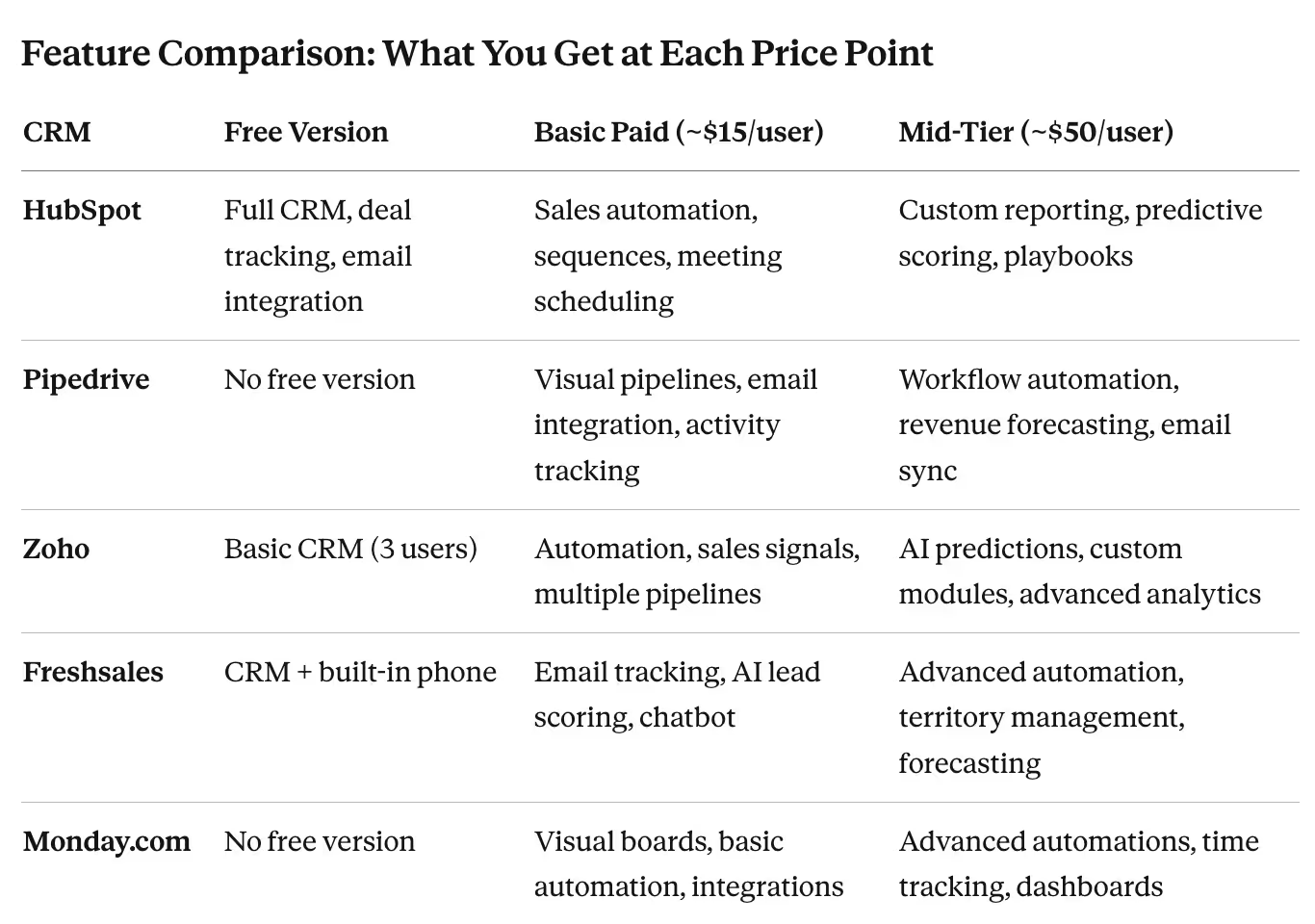
Pricing: (Verified January 2026) Free forever (up to unlimited users), paid plans start at $15/user/month
Why it works for SMBs: HubSpot disrupted the CRM market by offering genuinely useful features for free, not a neutered "trial version" designed to force upgrades. The free tier includes contact management, deal tracking, email integration, meeting scheduler, and basic reporting—everything a small business actually needs.
Standout features:
- Email tracking and notifications when prospects open your emails
- Meeting scheduler that eliminates back-and-forth scheduling emails
- Document sharing with tracking (see when prospects view your proposals)
- Mobile app that's actually usable, not an afterthought
- Seamless upgrades to Marketing Hub or Sales Hub when you need more power
Where it shines: Companies with 5-50 employees who want room to grow. The free version handles most SMB needs, and the paid tiers (Marketing, Sales, Service hubs) provide clear upgrade paths as you scale.
Limitations: Advanced features like custom reporting, sales automation, and predictive lead scoring require pricey Professional or Enterprise tiers. Email deliverability can be inconsistent if you're using the built-in email tool for bulk sends.
Best for: B2B service companies, consultancies, agencies, SaaS startups, and any business that wants a free CRM that doesn't feel like a trap.
2. Pipedrive — Best for Sales-Focused Teams
Pricing: (Verified January 2026) Starting at $14/user/month
Why it works for SMBs: Pipedrive was built by salespeople who were frustrated with bloated CRMs. The result is a laser-focused tool designed around one goal: moving deals through your pipeline. No unnecessary features, no confusion, just clean deal management.
Standout features:
- Visual pipeline interface that makes deal stages immediately clear
- Activity-based selling methodology baked in (the system nudges you to take action)
- Smart contact data enrichment that auto-fills company info
- Email integration that actually works reliably across Gmail, Outlook, and others
- Revenue forecasting that's simple but accurate enough for SMB decision-making
Where it shines: Companies with 3-30 employees where sales is the primary function. If your business lives and dies by closing deals, Pipedrive keeps everyone focused on revenue-generating activities.
Limitations: Marketing features are minimal—this is a sales tool, not an all-in-one platform. Reporting is good but not as customizable as HubSpot. Less suitable for service-based businesses focused on long-term relationships rather than new deals.
Best for: B2B sales teams, distributors, real estate agencies, recruitment firms, and any business with clearly defined sales processes.
3. Zoho CRM — Best Value for Growing Businesses
Pricing: (Verified January 2026) Free (up to 3 users), paid plans from $14/user/month
Why it works for SMBs: Zoho offers enterprise-grade features at SMB prices. It's the "jack of all trades" CRM—not the absolute best at any single thing, but remarkably capable across the board for the cost.
Standout features:
- Extensive customization without needing a developer
- Workflow automation that rivals much more expensive platforms
- AI-powered sales assistant (Zia) that suggests next actions and predicts deal outcomes
- Multi-channel engagement (email, phone, social media) all in one place
- Native integration with the entire Zoho ecosystem (Books for accounting, Desk for support, etc.)
Where it shines: Companies with 10-100 employees that need a platform capable of handling complexity as they grow. Particularly strong for international businesses (supports 28 languages and multi-currency).
Limitations: Interface feels dated compared to HubSpot or Pipedrive. Initial setup requires more configuration to get right. Some users find the abundance of features overwhelming rather than helpful.
Best for: Growing businesses in transition from startup to scale-up, international companies, teams already using other Zoho products, businesses that need customization on a budget.
4. Freshsales (Freshworks) — Best for Teams New to CRM
Pricing: (Verified January 2026) Free (up to 3 users), paid plans from $9/user/month
Why it works for SMBs: Freshsales prioritizes simplicity without sacrificing essential functionality. If your team has never used a CRM before, this is the gentlest onboarding experience.
Standout features:
- Built-in phone system (included even in free plan)—dial directly from browser
- AI-based lead scoring that helps prioritize your outreach
- Event tracking that shows which pages prospects visit on your website
- Freddy AI chatbot for basic customer queries
- Excellent mobile app for field sales teams
Where it shines: Companies with 5-30 employees making their first CRM investment. The combination of simplicity and built-in calling makes it ideal for teams that do a lot of phone prospecting.
Limitations: Reporting capabilities are basic compared to competitors. Integration ecosystem is smaller than HubSpot or Zoho. Advanced automation requires higher-tier plans.
Best for: Inside sales teams, businesses migrating from spreadsheets, companies in retail or hospitality with field teams, startups building their first sales process.
5. Monday.com CRM — Best for Visual Thinkers
Pricing: (Verified January 2026) Starting at $12/user/month (3-user minimum)
Why it works for SMBs: If your team loves Trello, Asana, or visual project management, Monday.com CRM brings that same interface to customer relationship management. It's highly visual, endlessly customizable, and doubles as a project management tool.
Standout features:
- Drag-and-drop customization with no coding required
- Color-coded boards that make pipeline status instantly visible
- Automation recipes that connect CRM activities to other workflows
- Works as both CRM and project tracker for service delivery
- Excellent for teams that need to see both sales pipeline and project delivery in one place
Where it shines: Service businesses (agencies, consultancies, contractors) that need to track both sales opportunities and project delivery. Teams that think visually and prefer boards over traditional list views.
Limitations: Can become expensive as you scale (per-user pricing adds up). Not as sales-focused as Pipedrive—it's more flexible but less opinionated about process. Email capabilities are weaker than dedicated CRMs.
Best for: Creative agencies, consulting firms, professional services, construction companies, event planners—businesses where sales and delivery are interconnected.
How to Choose: A Decision Framework
Start with HubSpot if:
- You're just beginning your CRM journey and want to start free
- You need marketing and sales capabilities to work together
- Your business model involves content marketing or inbound leads
- You want a platform you can grow into without switching later
- Team size: 5-50 people
Choose Pipedrive if:
- Sales is your primary focus and you do high-volume prospecting
- You have a defined sales process with clear stages
- Your team lives in the CRM daily and needs speed over features
- You want activity-based selling methodology built into the tool
- Team size: 3-30 people
Select Zoho if:
- You need extensive customization without breaking the bank
- You're growing quickly and need enterprise features at SMB prices
- You operate internationally and need multi-currency/language support
- You already use Zoho products (Books, Desk, etc.)
- Team size: 10-100 people
Pick Freshsales if:
- Your team is CRM-inexperienced and needs simple onboarding
- You do a lot of cold calling and need integrated dialing
- You want AI features without paying enterprise prices
- Your budget is tight but you need paid features
- Team size: 5-30 people
Go with Monday.com if:
- You run a service business that needs to track sales AND project delivery
- Your team prefers visual, Kanban-style interfaces
- You need flexibility to customize workflows extensively
- You want one tool for sales, projects, and internal collaboration
- Team size: 5-50 people
Common SMB CRM Mistakes to Avoid
Mistake #1: Buying based on features you don't need
That advanced AI-powered predictive analytics sounds impressive, but if you're closing 5 deals per month, you don't need it. Focus on core functionality you'll use daily.
Mistake #2: Skipping the trial period
Every CRM offers 14-30 day trials. Use them. Have your actual team members test the software with real customer data. If they're frustrated after a week, they'll abandon it entirely after three months.
Mistake #3: Ignoring mobile experience
If your sales team works remotely or in the field, a clunky mobile app will kill adoption. Test the mobile experience extensively during trials.
Mistake #4: Underestimating integration needs
Your CRM must talk to your email, calendar, and accounting software at minimum. Check integration capabilities before committing.
Mistake #5: Choosing the cheapest option without considering growth
Free is tempting, but if you'll need to migrate to a new CRM in 18 months because you outgrew it, you've wasted time and money. Think 2-3 years ahead.
Mistake #6: Not involving the sales team in the decision
The CRM is primarily a sales tool. If you choose it without sales team input, you'll face adoption resistance. Get their buy-in from day one.
Implementation Tips for SMB Success
Week 1: Foundation
- Set up user accounts for your team
- Import existing contact data (clean it first—garbage in, garbage out)
- Customize deal stages to match your actual sales process
- Connect email and calendar integrations
Week 2: Adoption
- Run training sessions (keep them short—30 minutes max)
- Create a simple "how-to" document for common tasks
- Make CRM usage non-negotiable (log it or it didn't happen)
- Assign one person as the internal CRM champion
Week 3-4: Refinement
- Review data quality and fix common entry mistakes
- Set up basic automations (task creation, email follow-ups)
- Create your first reports and review with the team
- Gather feedback and adjust processes as needed
Month 2+: Optimization
- Analyze which features your team actually uses (and which they ignore)
- Add more sophisticated workflows as team comfort grows
- Integrate additional tools as needed
- Review reports monthly to identify pipeline bottlenecks
Pricing Reality Check: What You'll Actually Pay
Many SMBs underestimate total CRM costs. Here's realistic budgeting:
Micro business (1-5 people):
- Free tier: $0 (HubSpot, Freshsales, Zoho)
- Basic paid: $50-150/month total
- Hidden costs: Time for setup and data entry
Small business (5-20 people):
- Budget: $200-600/month
- Consider: HubSpot Starter, Pipedrive Essential, Zoho Standard
- Hidden costs: Integration tools ($20-50/month), data enrichment services
Medium business (20-50 people):
- Budget: $600-2,000/month
- Consider: HubSpot Professional, Pipedrive Advanced, Zoho Professional
- Hidden costs: Training, potential need for part-time admin support
The Bottom Line
For most small and medium businesses, HubSpot CRM offers the best combination of functionality, usability, and cost (especially since the core product is free forever). It provides a solid foundation that can grow with your business without forcing you to migrate platforms.
However, if you're a sales-driven organization with a clearly defined pipeline, Pipedrive may be the better choice for its superior deal management focus. And if budget is extremely tight but you need more than a free tier offers, Zoho CRMdelivers remarkable value.
The best CRM for your business isn't the one with the most features or the flashiest interface—it's the one your team will actually use consistently. Start with a clear picture of your sales process, involve your team in the decision, and don't be afraid to try multiple options during trial periods.
Whatever you choose, remember that implementing a CRM is a process, not an event. Give your team time to adapt, be patient with the learning curve, and focus on consistent usage rather than perfect customization from day one. The ROI comes from disciplined execution, not from having the most sophisticated tool.
📋 About This Guide
This comprehensive guide is based on research and analysis of official platform documentation, verified user reviews, industry benchmarks, and publicly available information (verified January 2026).
Learn more: Read our complete research methodology to understand how we evaluate software tools.
Content Verification: All information in this guide was verified as accurate in January 2026. Platform features, pricing, and offerings are subject to change. We recommend verifying current details directly with vendors before making purchasing decisions.