

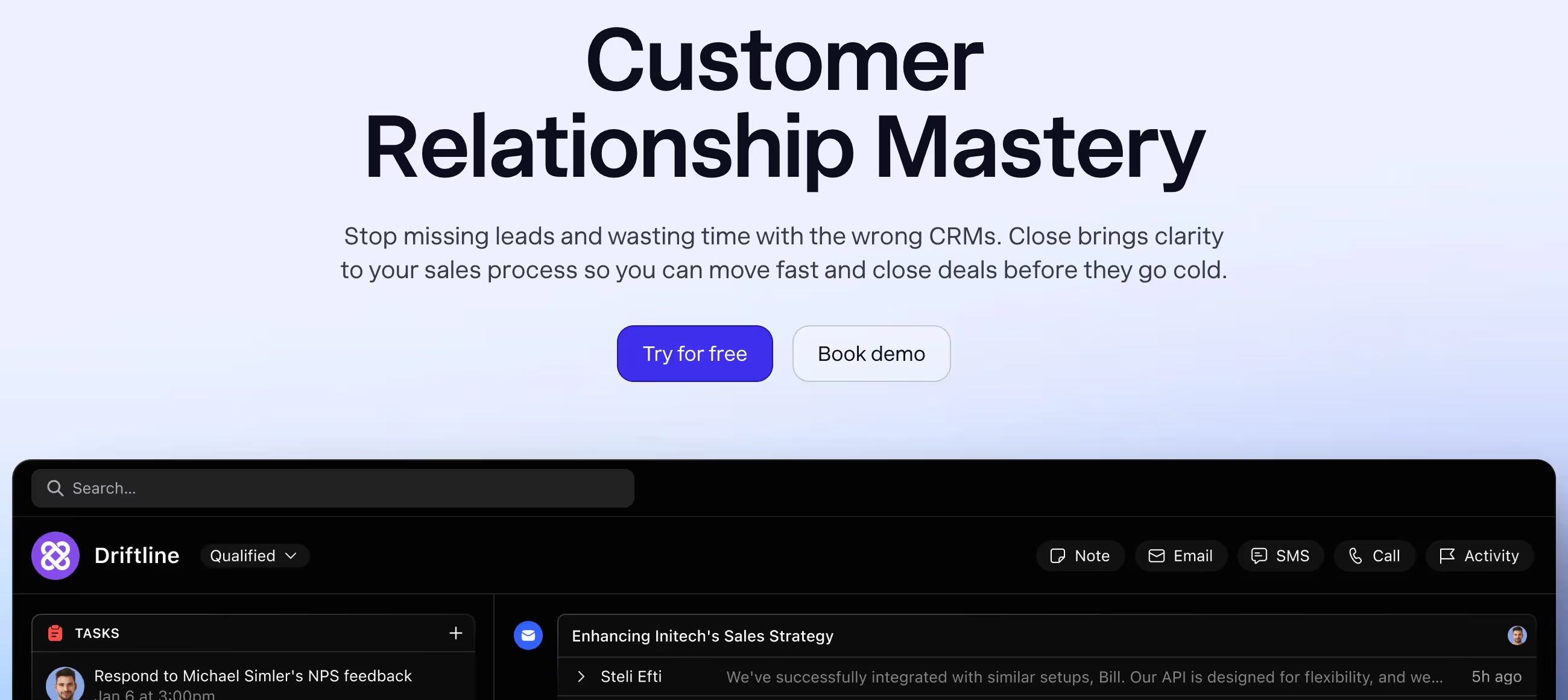
✨ Is Close Right for You?
What it is: A sales engagement CRM that puts calling, texting, and emailing inside your CRM instead of juggling separate tools. Built specifically for outbound sales teams making lots of calls and sending lots of emails to close new business.
Best for: Startups and SMBs (5-50 sales reps) doing high-volume B2B prospecting—SaaS sales teams, lead gen agencies, inside sales operations where reps make 50+ calls daily and need speed over complexity.
Main limitation: Built exclusively for getting the sale, not keeping the customer. Once you close a deal and need client management, retention tools, or ongoing service tracking, Close falls short. Also designed for B2B—retail and B2C businesses find it frustrating.
Get it if: Your sales team lives on the phone and email doing outbound prospecting, you're tired of switching between your CRM and separate calling/email tools, speed matters more than features, and you sell B2B with clear handoff to account management after the sale.
Skip it if: You need strong customer retention and account management features post-sale, operate in B2C or retail where customer relationships continue long-term, require extensive customization and reporting, or want comprehensive support (Close's support frustrates many users).
🎯 Why Close?
Most CRMs make you switch between the CRM, a calling platform, an SMS tool, and email automation software. Close builds it all into one interface—you click a contact's name and immediately call, text, or email without opening another tab or tool. This speed advantage matters when your team makes 100+ calls daily.
⚡ Actually Built for Speed
Close claims its UI runs 50% faster than popular CRMs like Salesforce or HubSpot. That's not marketing fluff—the interface loads quickly, actions happen instantly, and you don't wait for pages to refresh. When sales reps make dozens of calls daily, those seconds compound into hours of productive selling time saved weekly.
📞 Built-In Calling That Works
Power dialer, predictive dialer, call recording, voicemail drop, local presence (shows local numbers when calling)—professional calling features that typically require expensive add-ons come standard. The Twilio-powered phone system delivers clear call quality. Reps can call from desktop or mobile app with the same number, maintaining consistency.
💬 SMS Texting Integrated
Text contacts directly from their CRM record using your business number. Conversations thread chronologically with emails and calls, giving complete communication history. SMS automation sends scheduled follow-ups. This matters for industries where texting gets better response than email (real estate, local services, consumer-facing B2B).
📧 Email That Actually Syncs
Two-way email sync pulls your entire Gmail/Outlook history with contacts automatically. Send individual emails or bulk campaigns using templates. Email sequences automate multi-touch followup. Track opens, clicks, and replies. Unlike tools that require manual logging, Close captures everything automatically—saving hours of admin work weekly.
🎯 Workflows for Outbound Cadences
Create multi-step sequences combining calls, emails, and SMS over days or weeks. Template a 7-day outbound cadence: Day 1 email, Day 2 call, Day 3 LinkedIn message (manual task), Day 5 email, Day 7 call. Once built, apply the workflow to leads and Close automates the timing—you just execute when tasks appear.
📊 Pipeline Built for Sales
The pipeline view shows exactly what matters: which deals close this month, total pipeline value, conversion rates by stage, rep performance. No fluff dashboards or vanity metrics—just revenue-focused data that sales managers actually use. Custom fields let you track deal-specific info without complexity.

📈 What Close Users Typically Achieve
You'll Reach 2-3x More Prospects Daily
The power dialer, email automation, and consolidated interface let reps contact significantly more leads than manual prospecting methods. Instead of making 20-30 calls daily, productive reps hit 60-100 calls. The efficiency comes from eliminating dead time between calls, automating email followup, and removing tool-switching friction.
Communication History Becomes Automatic
Email sync pulls complete conversation history with every contact automatically. Call recordings and SMS threads appear chronologically with emails. Reps see context instantly without hunting through separate tools or relying on memory. This historical visibility improves followup quality and prevents embarrassing "did we already discuss this?" moments.
Admin Work Drops Dramatically
Manual activity logging disappears—calls, emails, texts all record automatically. Task creation and followup scheduling happen through workflows rather than manual reminders. Template libraries ensure consistent messaging without writing every email from scratch. Teams report saving 5-10 hours weekly per rep on administrative tasks.
Pipeline Visibility Improves Forecasting
Managers see real-time pipeline data: deal values, stage conversion rates, rep activity levels, forecast accuracy. The transparency helps identify bottlenecks (where deals stall), coaching opportunities (low activity reps), and accurate revenue projections. Sales meetings focus on data rather than anecdotes.
But Customer Retention Becomes a Problem
Once deals close, Close offers minimal tools for ongoing customer management. You'll need separate systems for customer success, support ticketing, upsell tracking, renewal management. Teams serving ongoing client relationships find themselves maintaining multiple databases—Close for sales, another platform for everything after.
Support Issues Cause Delays
Email-only support with inconsistent response times means problems don't get resolved quickly. When your CRM is down or features aren't working, waiting hours or days for email responses costs real money in lost productivity. Teams without internal technical resources find this particularly frustrating.
💡 Here's what works: Use Close exclusively for new business acquisition with clear handoff processes to account management systems post-sale. The platform shines for prospecting and closing—don't force it into customer retention roles it wasn't designed for. Also, budget 2-3 weeks for team training on workflows and sequences. The basic CRM is intuitive, but the automation features require learning to maximize value.
🛠️ How Close Works
Think of it as a CRM that swallowed your phone system and email tool. Everything sales reps need to prospect, follow up, and close deals lives in one fast interface designed to minimize clicks and maximize talk time.
Getting Started
Sign up for the 14-day trial (no credit card required). Import contacts from your old CRM or CSV files. Connect your email (Gmail or Outlook) for two-way sync. Add a phone number (comes with the platform) or port your existing business number. Team setup takes 2-4 hours for basic configuration.
Daily Sales Workflow
Reps log in and see their task list: scheduled calls, email followups, deals needing updates. Click a lead's name to see complete history—every email exchanged, call made, text sent, timeline of interactions. Need to call? Click the phone icon and you're dialing. Need to email? Type and send without leaving the contact record. Everything logs automatically.
Outbound Prospecting
Upload a lead list or import from LinkedIn, web forms, or purchased data. Assign leads to reps, apply call/email sequences, and start prospecting. The power dialer queues up calls automatically—when one ends, the next lead loads immediately. This efficiency lets reps reach 3x more prospects daily versus manual dialing.
Email Campaigns
Build email templates with merge fields (personalization). Send one-off emails or create sequences (automated drip campaigns). Emails send from your personal domain maintaining deliverability. Track which emails get opened and clicked. Followup automatically when recipients engage. The email automation rivals dedicated tools like Outreach or Salesloft at a fraction of the cost.
Calling Features
Make calls from desktop (browser-based) or mobile app. Local presence shows recipients a local area code increasing answer rates. Record calls for training and compliance. Drop pre-recorded voicemails with one click when reaching voicemail. Predictive dialer (higher tiers) calls multiple numbers simultaneously, connecting reps only when someone answers—maximizing talk time.
Pipeline Management
Create custom pipeline stages matching your sales process. Drag deals between stages as they progress. Set probability percentages for forecasting. Filter views by rep, date range, deal size. Close automatically calculates pipeline value and expected close amounts. Reports show conversion rates between stages identifying bottlenecks.
Team Collaboration
Managers see all team activity: calls made, emails sent, deals moved, tasks completed. Call recordings let managers coach reps on actual conversations. Shared templates ensure consistent messaging. Activity feeds show who's working what leads preventing overlap. The transparency keeps teams aligned without micromanagement.
⚙️ Core Features & Performance
📞 Calling Capabilities
Built-in calling via Twilio with clear call quality, automatic call logging, recording, transcription (add-on), local presence, power dialer, predictive dialer (Scale plan), voicemail drop, call disposition coding—everything outbound teams need. No separate phone platform required. Mobile app lets reps call from anywhere maintaining the same business number.
💬 SMS & Texting
Two-way SMS conversations integrated with email and call history. Automated text sequences for followup. Bulk texting with personalization. Delivery and read receipts. Templates for common responses. Works from desktop and mobile. Particularly valuable for industries where texting beats email response rates.
📧 Email Automation
Gmail and Outlook sync pulls complete email history automatically. Templates with merge fields for personalization. Email sequences (automated drip campaigns) with conditional logic. Bulk sending that looks one-to-one. Open and click tracking. Reply detection triggers followup tasks. The email features match dedicated sales engagement platforms.
🎯 Lead & Contact Management
Unlimited contacts and leads on all plans. Custom fields for tracking industry-specific data. Lead scoring and assignment rules. Duplicate detection on import. Activity timeline shows chronological communication history. Search and filter by any field. Import from spreadsheets, other CRMs, or web forms.
📊 Reporting & Analytics
Pipeline reports, activity reports (calls/emails by rep), conversion funnel analysis, forecasting, team performance dashboards. Custom reports build from any field. Scheduled email delivery of reports. Real-time data updates. Not as deep as enterprise analytics but covers essential sales metrics without complexity.
🔌 Integrations
Native integrations with Slack, Calendly, PandaDoc, QuickBooks, Stripe, Zapier, and 100+ tools. API access for custom integrations. Webhooks for real-time data sync. Zapier connects to thousands of additional apps. The integration ecosystem handles most common business tool connections.
📱 Mobile Apps
iOS and Android apps provide full CRM access on mobile—make calls, send texts/emails, update deals, complete tasks, view pipeline. The mobile experience matches desktop functionality unlike many CRMs where mobile apps feel like afterthoughts. Essential for field sales teams working remotely.
🚀 Quick Win: Start with the Essentials plan ($35/user/month annual) to test the calling and email features with your team. The Solo plan ($9/month) works for individuals but lacks the automation and workflow features that make Close valuable. Upgrade to Growth when you need advanced features like sequences and multiple pipelines.
📊 The Verdict: Our Assessment
8.2/10 - Close delivers exceptional value for outbound sales teams needing calling, texting, and email in one fast platform, but narrow focus on new business acquisition excludes broader CRM use cases.
🎯 Bottom Line: Choose Close when your sales team does high-volume outbound prospecting (50+ calls daily), needs calling/texting/email in one tool, values speed over features, and operates in B2B where deals close and hand off to account management. The consolidated workflow saves hours weekly.
⚠️ Skip if: You need strong post-sale customer management, operate in B2C or retail with ongoing customer relationships, require extensive customization and reporting, want phone support (Close offers email only), or sell products needing long-term account nurturing rather than quick closes.
💬 What Users Say: Reviews & Verified Experiences
User ratings: 4.7/5 on G2 (1,700+ reviews), 4.6/5 on Capterra (150+ reviews).
👍 Pros: What Users Love
- Consolidation Wins: "What I liked about Close was the consolidation of tools into one CRM. The sales pipeline and lead management was incredibly intuitive and ready to jump into right out of the box," Capterra verified review. Having calling, SMS, and email in one place eliminates tool-switching that kills momentum.
- Email History Magic: "By adding our first lead's email, within seconds we had a full history of each email we exchanged in the past," Capterra review. The automatic email sync surfaces complete communication history without manual logging—saving hours of admin work weekly.
- Speed Matters: "Close's UI is up to 50% faster than other popular CRMs," per Close. Users consistently note the fast interface lets them work quicker—pages load instantly, actions execute immediately. This speed compounds into significant time savings for teams making dozens of calls daily.
- Workflows Save Time: "The 'workflows' or automations on sending out follow ups on schedule and utilizing templates is also something awesome only found on CRMs that cost 4x as much," Capterra verified review. The automation features match enterprise tools at SMB pricing.
👎 Cons: Common Complaints
- Support Frustration: "Support is awful. No phone number to call. You email and at the companies convenience, not the clients they email you back," G2 verified review. Email-only support with slow response times frustrates users needing urgent help. The lack of phone support feels ironic for a CRM built around calling.
- B2B Only Design: "Features are clearly targeting the saas sales segment, which wasn't helpful for my agency which essentially is a retail business model," Capterra verified review. The platform assumes B2B workflows where you close and hand off—not ongoing customer relationships typical in B2C, retail, or service businesses.
- No Call History Without Leads: "There's no call history—if a call ends and the lead isn't added, then the call's number/history is lost in the ether," Capterra review. Inbound calls that don't get converted to leads disappear from history, problematic for businesses handling walk-in or phone-in traffic.
- Limited Post-Sale Tools: "There's also not really much functionality for MAINTAINING/RETENTION of clients after the sales aspect," Capterra verified review. Once you close a deal, Close offers minimal tools for ongoing account management, customer success, or retention activities.
🚫 3 Critical Mistakes to Avoid
Mistake #1: Using Close for Customer Retention
A consulting agency bought Close to manage their complete client lifecycle—from prospecting through multi-year client relationships. Six months in, they struggled with limited features for ongoing account management: no customer health scoring, weak renewal tracking, minimal support ticket integration. They ended up maintaining separate systems for customer success, frustrated they couldn't use one platform for everything.
⚡ Fix it: Understand Close is built for getting the sale, not keeping the customer. If your business model requires ongoing client management (agencies, consultancies, service providers), plan for separate customer success platforms post-sale. Close excels at sales, use it for that, and integrate with tools like HubSpot Service Hub or Zendesk for post-sale customer management. Don't force Close into roles it wasn't designed for.
Mistake #2: Choosing It for B2C or Retail Sales
A retail business with walk-in customers bought Close hoping to track customer interactions. They quickly hit frustrating limitations: no way to capture inbound calls unless converted to leads during the call, address fields show city/state but not full addresses (critical for local delivery), minimal features for repeat customer management. The platform felt like it was fighting their workflows rather than supporting them.
⚡ Fix it: Close is purpose-built for B2B outbound sales where you prospect, close, and hand off to account management. If you operate B2C, retail, or local services with walk-in traffic and ongoing customer relationships, Close will frustrate you. Choose CRMs designed for your business model—tools like Zoho CRM or Pipedrive offer more flexibility for B2C and retail workflows. Trial Close thoroughly with your actual workflows before committing.
Mistake #3: Starting Too High on Pricing Tiers
A startup with 5 sales reps signed up for the Scale plan ($149/user/month) thinking they needed all features immediately. They spent $8,940 annually on features they didn't use—predictive dialer, dedicated success manager, advanced permissions. Three months in, they realized the Essentials plan ($35/user/month) covered everything they actually needed, costing them $6,840 in unnecessary spending annually.
⚡ Fix it: Start with Essentials ($35/user/month annual) for teams under 10 reps. It includes calling, SMS, email automation, and basic workflows—everything most small sales teams need. Upgrade to Growth ($99/user/month) only when you hit real limitations: need for more pipelines (Essentials caps at 3), advanced email sequences, or enhanced reporting. Scale ($149/user/month) makes sense for 20+ rep teams needing predictive dialing and dedicated support. Don't pay for features you might use someday—upgrade when you actually need them.
FAQ
How much does Close really cost?
Plans: Solo $9/month (1 user only), Essentials $35, Growth $99, Scale $149 per user/month billed annually. Monthly billing available at higher rates. 14-day free trial, no credit card required.
Can I use Close for customer retention and account management?
No—Close is built for new business acquisition, not post-sale customer management. Once deals close, you'll need separate tools for customer success, support, and retention.
Does Close work for B2C or retail businesses?
Not recommended. Close is designed for B2B outbound sales. B2C and retail workflows (walk-in traffic, ongoing relationships, full address display) don't fit the platform well.
What kind of support does Close offer?
Email support only (no phone). Response times vary—this frustrates users needing urgent help. Higher tiers get priority support and dedicated success managers.
Can I make calls and send texts from Close?
Yes—built-in calling and SMS via Twilio. Make calls from desktop or mobile app, send texts, record calls, drop voicemails. Phone number included with platform.
How long does Close implementation take?
Basic setup: 2-4 hours. Full team deployment with workflows and sequences: 2-3 weeks including training. Import contacts, connect email, configure sequences, train team.
Suggestly
Find your best-fit B2B tool in 90 seconds
✓ Free personalized recommendations
✓ Based on YOUR business needs
✓ No signup required

Close




