Cost of Email Marketing: What to Budget in 2026 (Beyond the Sticker Price)
What does email marketing really cost? Honest pricing breakdown across platforms, hidden fees, ROI benchmarks, and realistic budgets for businesses in 2026.
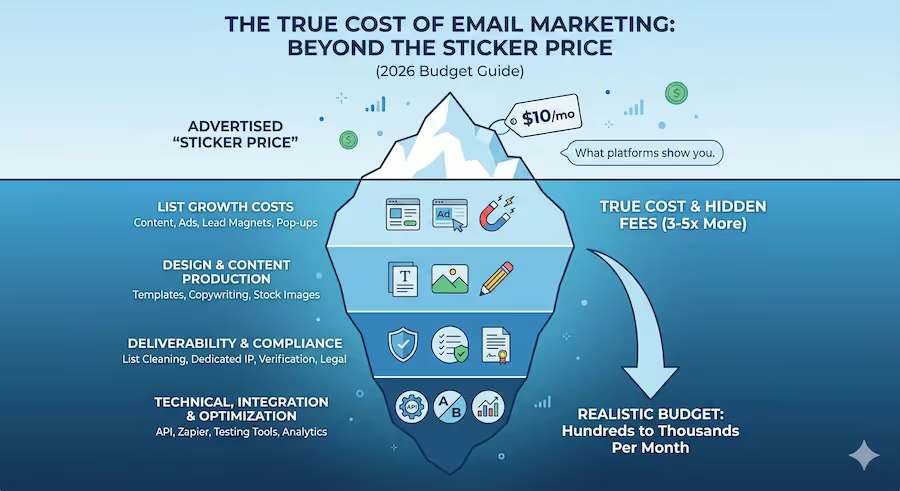
Email marketing platforms advertise "$10/month" pricing, but most businesses end up paying 3-5x that amount once they account for actual subscriber counts, feature requirements, and hidden costs. If you're budgeting for email marketing, those advertised starting prices are misleading—sometimes deliberately so.
This guide breaks down the real cost of email marketing: what you'll actually pay based on your list size and needs, which pricing models make sense for different business types, and which hidden costs catch companies off guard. By the end, you'll know how to budget accurately and avoid expensive surprises.
Understanding Email Marketing Pricing Models
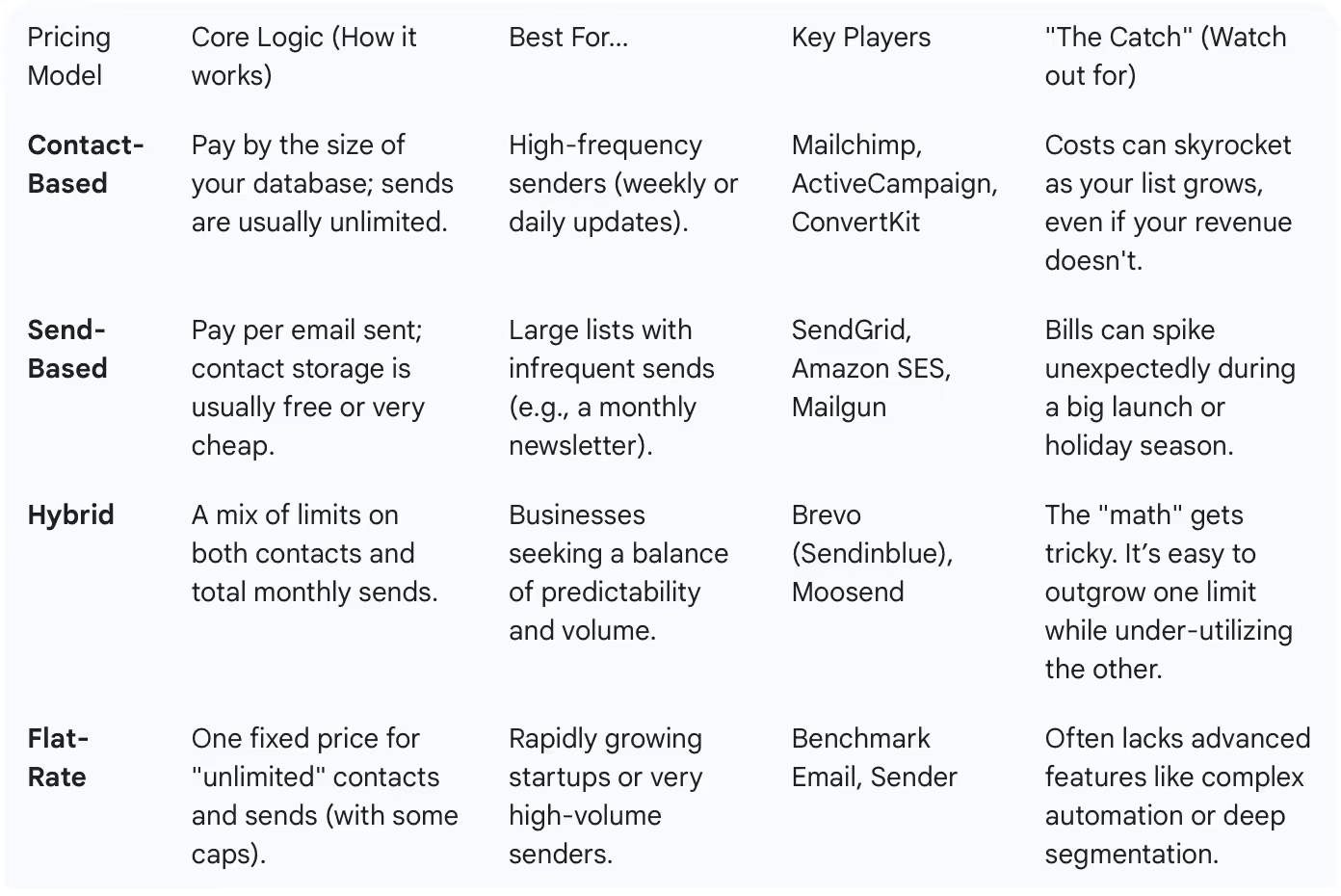
Email marketing platforms use four main pricing structures, and understanding these is essential to accurate budgeting.
1. Contact-Based Pricing (Most Common)
You pay based on the number of contacts in your database, regardless of how many emails you send.
How it works: $20/month for 1,000 contacts, $50/month for 5,000 contacts, etc.
Used by: Mailchimp, ActiveCampaign, ConvertKit, MailerLite, most popular platforms
Best for: Businesses that send frequent emails to their entire list. If you email your full database weekly or more, this model is cost-effective.
Watch out for: Costs can escalate quickly as your list grows. Growing from 5,000 to 10,000 contacts might double your bill, even if your revenue hasn't increased proportionally.
2. Email Send-Based Pricing
You pay per email sent, with contacts being unlimited or having very high limits.
How it works: $0.50 per 1,000 emails sent, or bulk packages like 50,000 sends for $50
Used by: SendGrid, Amazon SES, Postmark, Mailgun
Best for: Businesses with large lists but infrequent sending. If you have 50,000 contacts but only send monthly, you'll save significantly versus contact-based pricing.
Watch out for: Costs become unpredictable if sending volume varies month to month. One product launch or big campaign can spike your bill unexpectedly.
3. Hybrid Pricing
You pay based on both contacts and sends, but with generous limits on each.
How it works: $10/month for 500 contacts and unlimited sends, or $X for 10,000 sends to up to 5,000 contacts
Used by: Brevo (formerly Sendinblue), Moosend
Best for: Businesses that want predictability but occasionally send high volumes for specific campaigns.
Watch out for: The math can get complicated. You need to carefully estimate both your list growth and sending frequency to determine if this is economical.
4. Flat-Rate Pricing
One price gets you unlimited contacts and unlimited sends (usually with caps suitable for SMBs).
How it works: $99/month for unlimited everything (within reasonable limits like 50,000 contacts)
Used by: Benchmark Email, Sender
Best for: Fast-growing businesses where contact-based pricing would become prohibitively expensive, or high-frequency senders.
Watch out for: These platforms may have limitations on automation, segmentation, or support. The "unlimited" often comes with feature trade-offs.
Real-World Pricing: (Verified January 2026) What You'll Actually Pay
Let's look at realistic pricing for different business sizes across popular platforms. These prices reflect what you'd pay with typical feature requirements, not just the bare-minimum advertised price.
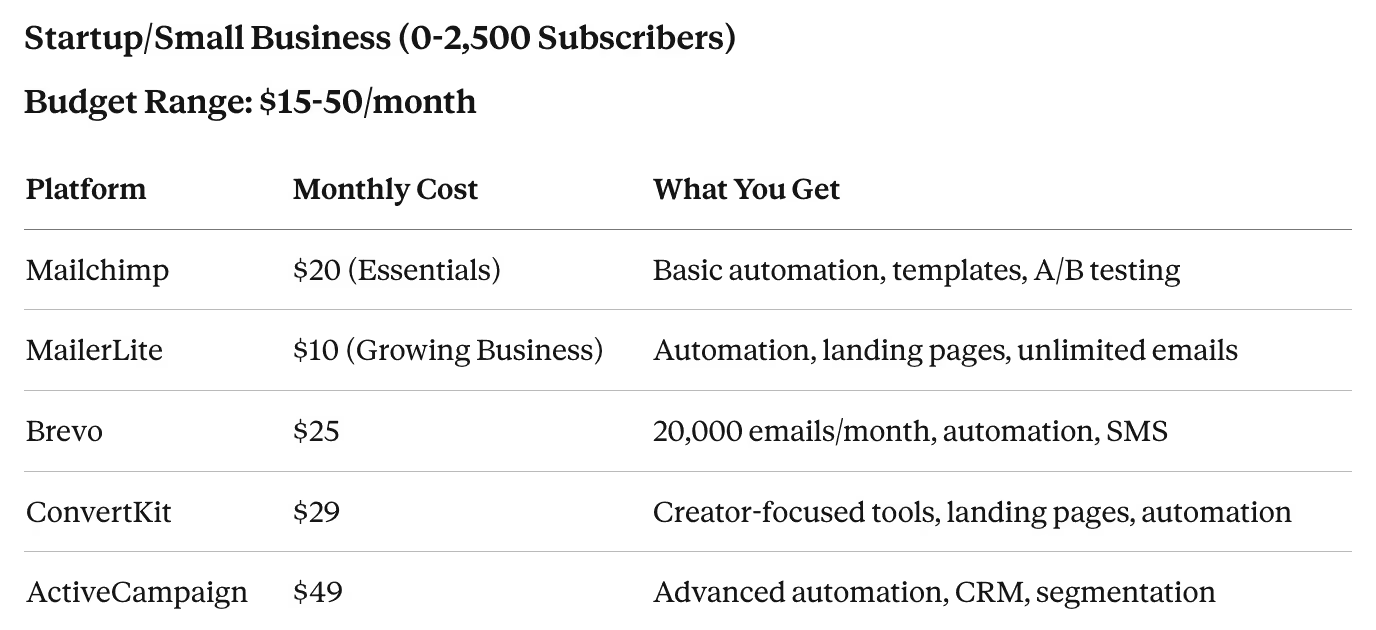
Reality check: Most businesses in this range can get by with free tiers (Mailchimp, MailerLite) if they're willing to display platform branding and accept limited features. However, once you need automation and branding removal, expect to pay $15-30/month minimum.
Hidden costs at this level:
- Email template design: $50-200 one-time (if you hire a designer)
- List cleaning services: $20-50/year
- Stock images: $10-30/month (if not using free sources)
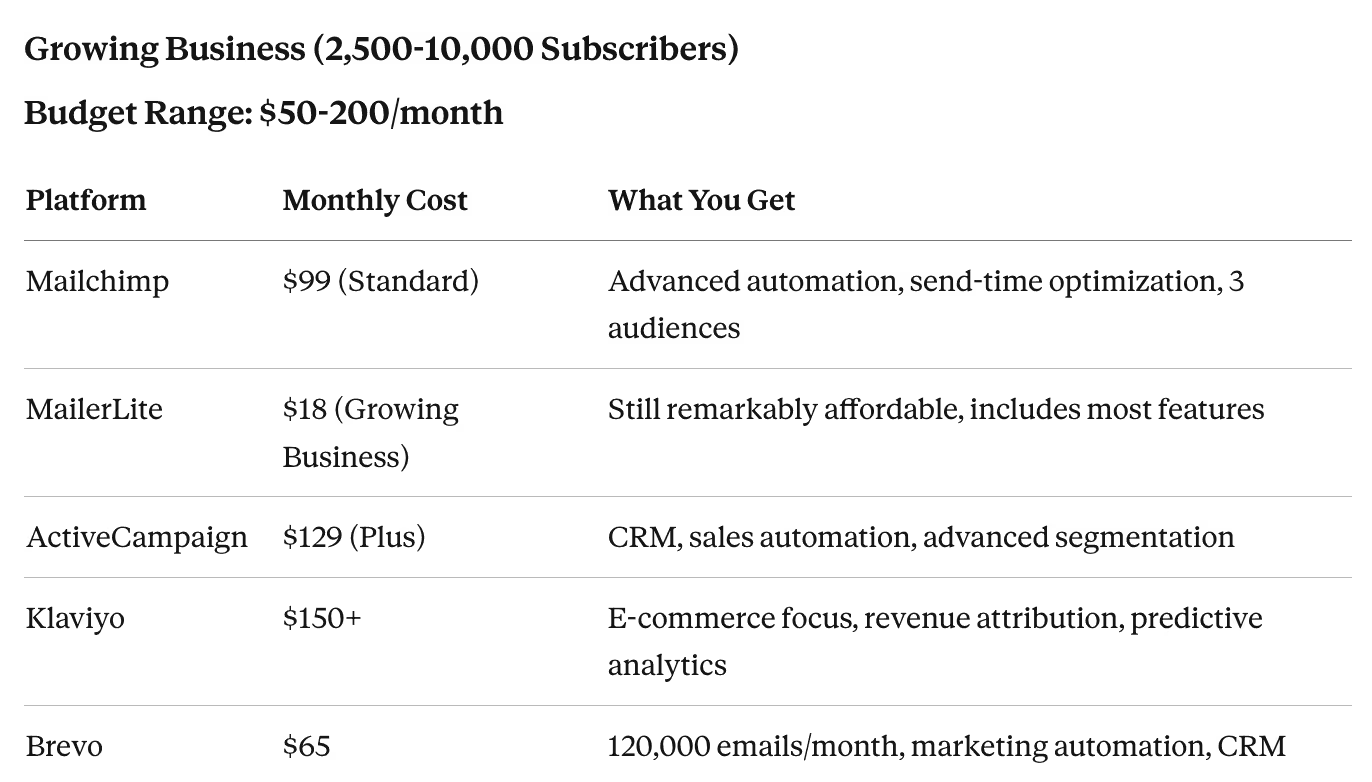
Reality check: This is where costs start diverging significantly. E-commerce businesses often gravitate toward Klaviyo despite higher costs because the ROI justifies it. B2B companies may choose ActiveCampaign for its CRM integration. Budget-conscious businesses can still use MailerLite and get 90% of the functionality at a fraction of the cost.
Hidden costs at this level:
- Integration tools: $20-100/month (Zapier, Make, or API custom work)
- Premium templates: $50-150 one-time or $30-50/month subscriptions
- List growth tools: $50-200/month (pop-up tools, lead magnets, landing pages)
- Deliverability monitoring: $30-100/month (if using third-party tools)
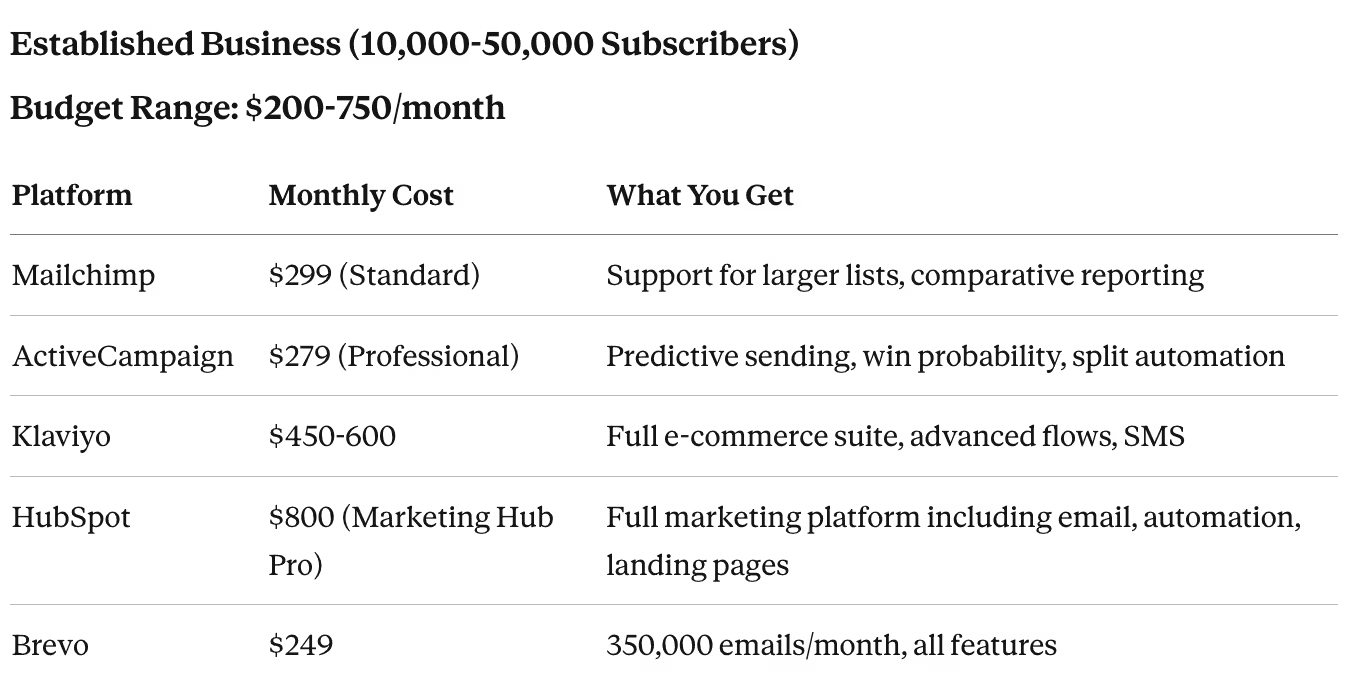
Reality check: At this scale, platform choice matters significantly for ROI. Klaviyo's higher cost is offset by revenue attribution and automation that drives more sales. HubSpot's cost includes a full marketing suite, not just email. Brevo and MailerLite remain surprisingly affordable alternatives if you don't need advanced features.
Hidden costs at this level:
- Dedicated IP address: $30-100/month (for better deliverability with some platforms)
- Email developer or agency: $500-2,000/month (for sophisticated campaigns)
- Advanced segmentation tools: $50-200/month
- A/B testing platforms: $50-150/month (if beyond basic email split tests)
- SMS add-ons: $100-500/month additional
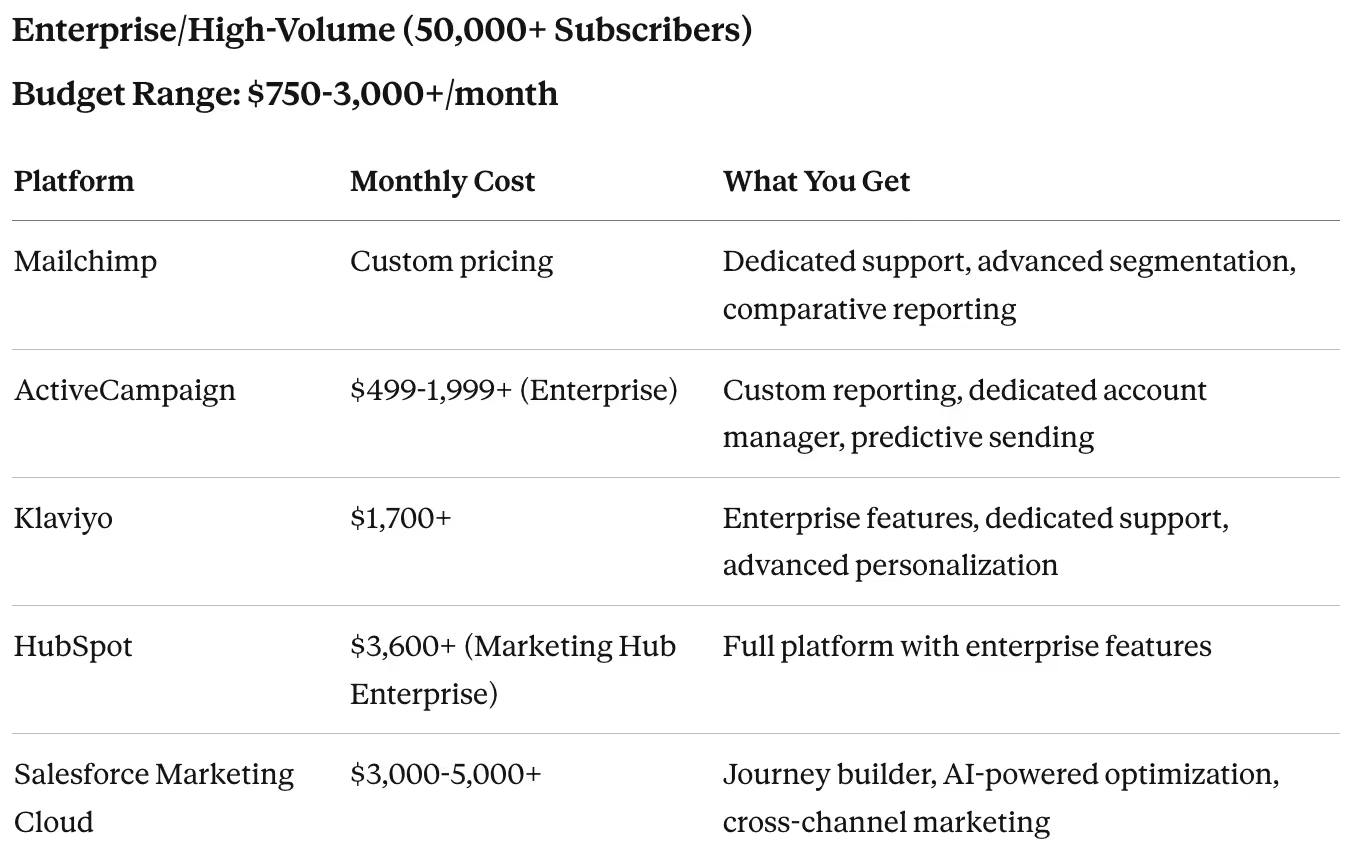
Reality check: At enterprise scale, you're not just buying software—you're buying strategic support, dedicated resources, and advanced capabilities. Most platforms move to custom pricing where you negotiate based on needs. Many enterprises also maintain relationships with multiple platforms for different purposes (transactional emails on SendGrid, marketing campaigns on Klaviyo, etc.).
Hidden costs at this level:
- Implementation and onboarding: $5,000-50,000 one-time
- Dedicated email marketing manager: $60,000-100,000/year salary
- Agency or consultant support: $2,000-10,000/month
- Deliverability specialists: $1,000-5,000/month
- Advanced analytics tools: $200-1,000/month
Hidden Costs Nobody Talks About (But You'll Pay Anyway)
1. List Growth Costs
Your email list doesn't grow for free. You need to budget for acquisition:
- Content creation: $500-5,000/month for lead magnets, gated content, etc.
- Landing page tools: $50-200/month (Unbounce, Instapage, or included in platform)
- Pop-up and form tools: $20-100/month (often separate from email platform)
- Lead magnets: Design and production costs of $100-1,000 per asset
- Paid acquisition: If using ads to grow list, budget $5-20 per subscriber depending on industry
2. Email Deliverability and Compliance
- List cleaning services: $50-200 per cleaning (recommended quarterly)
- Email verification tools: $50-150/month (NeverBounce, ZeroBounce, Clearout)
- Dedicated IP warm-up: Costs you in lost sending capacity for 4-8 weeks
- SPF/DKIM/DMARC setup: $200-1,000 one-time (if hiring technical help)
- Legal compliance reviews: $500-2,000 (ensuring GDPR, CAN-SPAM compliance)
3. Design and Content Production
- Professional template design: $500-2,000 one-time, or $50-150/month for template services
- Email copywriter: $100-500 per email if outsourcing, or $50-80k/year for in-house
- Stock images/graphics: $15-100/month (if using paid services beyond free options)
- GIF/animation creation: $50-300 per custom animation
4. Testing and Optimization
- Email preview tools: $50-200/month (Litmus, Email on Acid) to test rendering across clients
- A/B testing runs: Time cost of 20-40 hours/month for proper testing
- Heat mapping tools: $50-100/month (to optimize email layouts)
5. Integration and Technical Costs
- API custom work: $2,000-10,000 one-time for complex integrations
- Zapier/Make/n8n: $20-300/month depending on automation complexity
- Data syncing tools: $50-200/month if your email platform doesn't integrate natively with your CRM/e-commerce platform
ROI Benchmarks: What Results Should You Expect?
To determine if your email marketing spend is justified, compare against these industry benchmarks:
Average Return on Investment (Industry Benchmarks):
- Overall average: $36-42 for every $1 spent on email marketing
- E-commerce: $45+ per $1 spent (higher due to direct purchase attribution)
- B2B services: $25-35 per $1 spent
- Media/publishing: $40+ per $1 spent
Performance Benchmarks (2026 industry averages per email marketing research):
- Open rate: 18-25% (varies widely by industry)
- Click-through rate: 2.5-4%
- Conversion rate: 1-3% (of people who click)
- List growth rate: 2-5% monthly with active acquisition
How to calculate your ROI:
Monthly Revenue from Email / (Platform Cost + Hidden Costs + Time Cost) = ROI Multiple
Example calculation for a $5k/month business:
- Revenue from email campaigns: $8,000/month
- Platform cost: $150/month
- List growth costs: $200/month
- Design/content time: $400/month (10 hours @ $40/hour)
- Total costs: $750/month
- ROI: $8,000 / $750 = 10.6x return
If your ROI is below 5x, either your email marketing needs optimization or you're overspending on tools relative to results.
Pricing Model Comparison: Which Makes Sense for You?
Choose Contact-Based Pricing if:
- You send to your full list frequently (weekly or more)
- Your list is relatively stable (not rapidly growing)
- You value predictable monthly costs
- You need advanced automation and segmentation
- Example: B2B newsletter with 5,000 engaged subscribers, sending 2-3x weekly
Choose Send-Based Pricing if:
- You have a large list but send infrequently (monthly or less)
- Your list size fluctuates seasonally
- You primarily send transactional emails
- You're comfortable with variable monthly costs
- Example: E-commerce store with 100,000 contacts but only 2-3 promotional campaigns monthly
Choose Hybrid Pricing if:
- Your sending patterns are unpredictable
- You want flexibility without bill shock
- You're growing quickly and need a buffer
- You occasionally spike in volume (product launches, sales)
- Example: SaaS company with 10,000 contacts, normal monthly newsletters plus occasional feature announcements
Choose Flat-Rate Pricing if:
- Your list is growing rapidly (>10% monthly)
- Contact-based pricing is becoming unaffordable
- You're willing to trade some advanced features for cost savings
- You send high frequency emails
- Example: Course creator growing from 5,000 to 15,000+ subscribers within a year
Cost-Saving Strategies That Actually Work
1. Aggressively clean your list
Most businesses pay for thousands of inactive subscribers. Unsubscribe anyone who hasn't engaged in 6-12 months. A smaller, engaged list saves money and improves deliverability.
Savings potential: 20-40% reduction in platform costs
2. Choose the right pricing model
Many businesses stick with contact-based pricing when send-based would be 50% cheaper. Run the numbers annually.
Savings potential: 30-60% if you're on the wrong model
3. Master one platform before buying add-ons
Most platforms offer 80% of what you need natively. You don't need expensive third-party tools until you've maxed out built-in features.
Savings potential: $100-500/month in avoided tool subscriptions
4. Negotiate annually
Monthly plans are convenient but expensive. Annual plans typically offer 15-20% discounts, and many platforms negotiate custom pricing for yearly commitments.
Savings potential: 15-25% off annual costs
5. Build templates once, reuse forever
Invest in 3-5 high-quality templates and reuse them with different content. Stop paying designers for every campaign.
Savings potential: $200-1,000/month in design costs
6. Use free tools for peripheral tasks
Canva for graphics, Unsplash for images, Grammarly for copy editing—free tools can replace expensive subscriptions.
Savings potential: $50-150/month
7. Segment ruthlessly to reduce send volume
If you're on send-based pricing, don't email everyone every time. Segment and only email relevant subsets.
Savings potential: 20-50% reduction in send-based costs
Platform-Specific Pricing Insights
Mailchimp: Premium Brand, Premium Pricing
- Pro: Best-known brand, extensive integrations, powerful features
- Con: Most expensive option for larger lists (can be 2-3x competitors)
- Best for: Businesses that value brand recognition and ease of use over cost
- Budget trap: Grows expensive quickly beyond 5,000 subscribers
ActiveCampaign: Feature-Rich
- Pro: Exceptional automation, CRM included, powerful segmentation
- Con: Higher base price than alternatives, learning curve
- Best for: B2B companies needing sophisticated nurture sequences
- Budget trap: Professional and Enterprise tiers get expensive but are required for advanced features
MailerLite: Best Value for Some Businesses
- Pro: Incredibly affordable with generous features
- Con: Less sophisticated automation than premium options
- Best for: Budget-conscious businesses that don't need enterprise features
- Budget trap: Almost none—pricing stays reasonable even at scale
Klaviyo: E-commerce ROI Justifies Higher Cost
- Pro: Best-in-class e-commerce features, revenue attribution
- Con: Significantly more expensive than general-purpose platforms
- Best for: Online stores doing $50k+/month where email drives meaningful revenue
- Budget trap: Easy to justify cost when revenue is attributed, but painful if ROI isn't tracked
Brevo: Hybrid Model Hidden Gem
- Pro: Generous sending limits, affordable for high-volume senders
- Con: Interface less polished than Mailchimp, smaller integration ecosystem
- Best for: Businesses with large lists but moderate sending
- Budget trap: Limits can feel restrictive if you hit them, forcing upgrades
Final Budgeting Recommendations by Business Stage
Bootstrapped Startup (< $10k MRR):
- Platform: $0-50/month (MailerLite free or paid, Mailchimp free tier)
- Total realistic budget: $50-150/month (including list growth and design)
- Focus: Keep costs minimal while building your list and finding product-market fit
Growing Small Business ($10k-100k MRR):
- Platform: $50-300/month (MailerLite, Brevo, ActiveCampaign Lite)
- Total realistic budget: $200-600/month (including integrations, list growth, content)
- Focus: Invest in automation and segmentation to improve efficiency as you scale
Established Business ($100k-500k MRR):
- Platform: $300-1,000/month (ActiveCampaign Plus/Professional, Klaviyo, HubSpot)
- Total realistic budget: $800-2,500/month (including specialist support, advanced tools)
- Focus: Optimize for ROI, invest in deliverability, hire or contract specialist help
Enterprise ($500k+ MRR):
- Platform: $1,000-5,000+/month (Klaviyo, Salesforce Marketing Cloud, HubSpot Enterprise)
- Total realistic budget: $3,000-15,000+/month (including full team, agency support, tools)
- Focus: Advanced personalization, cross-channel campaigns, dedicated resources
The Bottom Line
The advertised "$10/month" email marketing prices are starting points, not realistic budgets. For most businesses, the true cost of email marketing is 3-5x the platform subscription once you account for list growth, design, deliverability, integrations, and optimization efforts.
Budget realistically:
- Small business (< 5,000 contacts): $100-300/month all-in
- Growing business (5,000-20,000 contacts): $300-1,000/month all-in
- Established business (20,000-100,000 contacts): $1,000-3,500/month all-in
- Enterprise (100,000+ contacts): $3,000-15,000+/month all-in
However, email marketing remains one of the highest-ROI channels available. Even with hidden costs, businesses see industry benchmarks indicate average returns of $36-42 for every dollar spent. The key is choosing the right platform for your needs, budgeting for the full cost picture, and obsessively tracking ROI to ensure your investment pays off.
Don't let sticker shock deter you—just budget accurately and measure relentlessly.
📋 About This Guide
This comprehensive guide is based on research and analysis of official platform documentation, verified user reviews, industry benchmarks, and publicly available information (verified January 2026).
Learn more: Read our complete research methodology to understand how we evaluate software tools.
Content Verification: All information in this guide was verified as accurate in January 2026. Platform features, pricing, and offerings are subject to change. We recommend verifying current details directly with vendors before making purchasing decisions.