

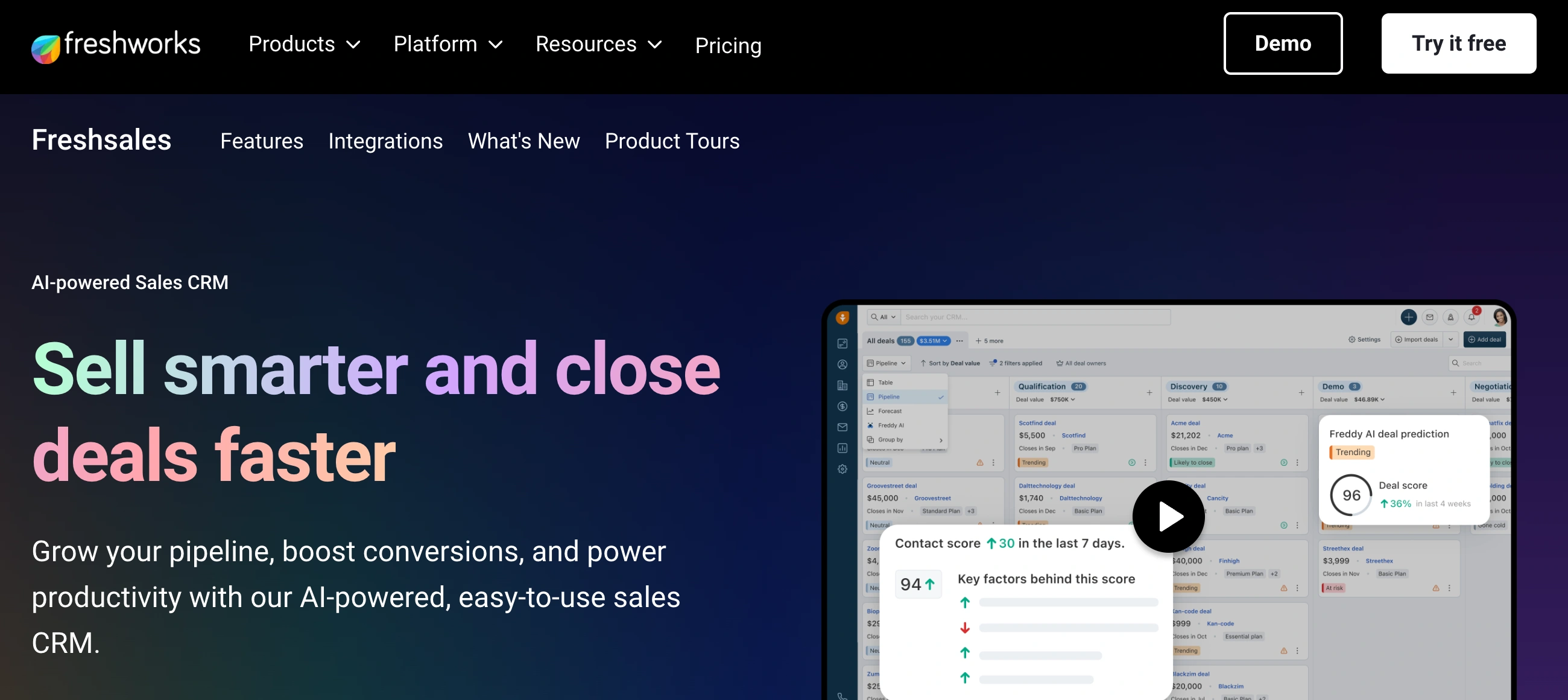
✨ Is Freshsales Right for You?
What it is: A sales CRM with built-in phone, email, and chat so you can call prospects, send sequences, and track deals without switching tools. Think all-in-one sales workspace with AI that scores your leads.
Best for: SMB sales teams doing high-volume outbound, especially if you're making 50+ calls daily. The built-in dialer across all plans (even free) is the standout feature. Also solid for teams that want AI lead scoring without enterprise pricing.
Main limitation: The free and $9 Growth plans are barebones—no workflows, no multiple pipelines, no AI features. You'll likely need the $39 Pro plan to get real value, which puts it in the same range as competitors with fewer limitations.
Get it if: You need CRM and calling in one tool and don't want to pay for separate dialers like Aircall or RingCentral. The built-in phone system saves both money and tab-switching headaches.
Skip it if: You need advanced reporting or complex automations—users consistently complain that creating custom reports is confusing. Also skip if you need 24/7 support (they only do 24/5).
🎯 Why Freshsales?
Most CRMs make you bolt on third-party tools for calling, pay extra for AI features, and jump between five tabs to complete one outreach sequence. Freshsales bundles phone, email, chat, and AI into the base platform.
📞 Built-In Phone That Actually Works
You can buy virtual numbers in 90+ countries and make calls straight from your browser or mobile app. Every call auto-logs to the contact record with notes, recordings, and duration. For outbound teams, this eliminates the usual Twilio integration nightmare or paying $30+/month for tools like Aircall.
🤖 Freddy AI Tells You Who to Call
Their AI (called Freddy) analyzes email opens, website visits, and engagement patterns to score leads. It flags which deals are at risk and suggests next actions. This isn't marketing fluff—users specifically mention that lead scoring helps them focus on warm prospects instead of wasting time on cold ones.
⚡ Automation Without the Coding
Set up sequences to auto-send follow-ups, assign leads based on territory, update deal stages, and trigger tasks when contacts hit certain actions. The workflow builder is visual and doesn't require technical skills, though you'll need at least the $39 Pro plan to use it properly.
💸 The Pricing Trap
Starting at $9/user/month looks great until you realize that tier doesn't include email sequences, AI scoring, or workflow automation. The free plan is limited to 3 users. Most teams end up on Pro at $39/user/month to get features that HubSpot and Pipedrive include at lower tiers.

📈 Success Story: Blue Nile Cuts No-Shows to 20%
Blue Nile struggled with no-show appointments wasting their sales team's time. They implemented Freshsales to better track engagement, automate reminders, and identify serious prospects early.
The built-in communication tools let them send automated confirmations, log every touchpoint, and flag at-risk appointments before they happened. Freddy AI helped prioritize which prospects were most likely to convert.
Results: Reduced no-show rates from over 40% to just 20%. Mike Hopkins, Senior VP of Sales and Service, says "time is money"—those recovered hours directly impacted revenue.
Other Freshsales customers hit similar wins: Chargebee scaled their sales team 10X over two years without losing pipeline visibility, CliqStudios accelerated sales cycles by 35% with better lead scoring, Klenty saw 200% increase in sales qualified leads with 35% better retention, and Synergy Enterprise Solutions achieved 40% MRR growth in 6 months.
💡 Pro Tip: Use the free plan to test the interface and built-in calling for a couple weeks. If your team likes it, jump straight to Pro—don't waste time on Growth. The feature gap makes Growth almost useless for most sales processes.
⚙️ How Freshsales Works
You can import contacts and start logging calls same-day. The interface is clean and most teams figure out the basics in under an hour. But configuring automation, setting up custom fields, and getting the AI trained on your data takes a few days to a week.
Getting Started: First Few Hours
Sign up (free for 3 users), connect your Gmail or Outlook, import your contacts via CSV. You're immediately logging emails and tracking deals. The kanban pipeline view is intuitive enough that reps start using it without training. Making calls requires buying phone credits, but setup takes minutes.
Daily Workflow: Where It Shines
Your team works from one screen. Click a contact, see their full history, call them, log notes, schedule follow-ups, and move the deal along—all without leaving the CRM. Email templates save time on outreach. Sequences automate the boring follow-up work. The AI highlights who to prioritize each morning.
The Learning Curve Reality
Basic use is dead simple. Advanced stuff gets messy. Building custom reports requires understanding their reporting logic, which users consistently describe as "complicated" and "difficult." Setting up complex automation workflows takes trial and error. Budget a few days for someone to become the internal expert.
🛠️ Core Features & Capabilities
Freshsales packs contact management, deal tracking, built-in phone/email/chat, AI lead scoring, workflow automation, and mobile apps. The depth varies dramatically by plan, so here's what actually matters day-to-day.
✅ Built-In Communication (All Plans)
Make calls, send emails, live chat with prospects—all from within the CRM. Every interaction logs automatically to the contact timeline. This is Freshsales' killer feature. You buy phone credits at standard rates (around $1 per line plus per-minute charges), but the integration is seamless.
✅ Lead & Deal Management
Kanban-style pipeline lets you drag deals between stages. Filter by owner, deal size, or close date. Track every touchpoint with a contact—emails, calls, meetings, notes—in one timeline. Multiple pipelines require the $39 Pro plan, which is annoying if you sell different products.
✅ Freddy AI (Pro Plan & Up)
AI analyzes your data to score leads, predict which deals will close, and flag at-risk opportunities. It suggests next actions based on deal health. But here's the catch—Freddy Copilot (the more advanced AI features) costs an additional $29/user/month on top of your plan.
✅ Workflow Automation (Pro Plan Required)
Auto-assign leads, trigger follow-up sequences when deals stall, create tasks when contacts take specific actions. The visual workflow builder is easy to use once you learn it. Unfortunately, this entire feature set is locked behind the $39 plan.
✅ Email Sequences & Templates
Create drip sequences that auto-send follow-ups based on recipient actions (opens, clicks, replies). Build a template library for common outreach. Bulk email functionality works well for campaigns. Email tracking shows opens and clicks in real-time.
✗ Reporting Gets Complicated
Pre-built reports cover basics like pipeline value and win rates. Custom reports require wrestling with their reporting logic. Multiple users specifically mention creating external dashboards in Excel or Python because Freshsales' reporting wasn't flexible enough.
🚀 Quick Win: Connect your email and import your contacts on day one. Use the built-in phone for a week before configuring anything else. Get your team comfortable with basic usage before diving into automation.
⭐ The Verdict: Our Assessment
Overall Rating: 8.2/10 - Strong for outbound sales teams that need integrated calling, but pricing and feature limitations sting.
Freshsales solves the "too many tools" problem for sales teams. Built-in phone, email, and chat mean you're not juggling Aircall, Outreach, and Intercom alongside your CRM. For high-velocity sales, that consolidation saves real time. But the feature gating between plans forces most teams to upgrade faster than expected.
Bottom Line: Choose Freshsales when built-in calling is a priority and you're comfortable paying $39/user/month for full functionality. Skip it if you need 24/7 support or complex custom reporting.
💬 What Users Say: Reviews & Verified Experiences
User ratings: 4.6/5 on G2 (1,220+ reviews), 4.5/5 on Capterra (590+ reviews), 3.3/5 on Trustpilot (110+ reviews).
👍 Pros: What Users Love
- All-in-One Communication: "I like Freshsales because it's easy to use and organize, and I can customize it to the way I like to work," notes one verified user. The built-in phone, email, and chat consistently get praised for eliminating the need to switch between tools.
- Setup Is Actually Quick: "It was really easy to set up everything as it provides step-by-step guidance," says a G2 reviewer. Most teams report being productive within hours, with basic pipeline management working out of the box.
- AI That Helps Prioritize: "What i like the best about Freshsales is its user friendly interface and automation capabilities, it simplifies lead management, automates followups, and provides a clear view of sales pipeline," according to a verified G2 review. Lead scoring genuinely helps teams focus on warm prospects.
- Cost-Effective for Features: "I like how cost-effective Freshsales is; for the cost, you're getting an entire suite with many features like sequences and email bulk facility," from a recent review. Teams appreciate getting calling, automation, and AI without enterprise CRM pricing.
👎 Cons: Common Complaints
- Reporting Is a Nightmare: "I've found creating Analytics Reports to be very complicated and difficult to understand - you need to follow the guidance on how to do this, or have help from someone who does understand," warns a Capterra reviewer. Multiple users mention building external dashboards because Freshsales reporting is too rigid.
- Customer Support Delays: "I have never experienced customer service THIS bad before. Total and complete incompetence," says one frustrated Capterra reviewer. "Support tickets are left open for weeks." The 24/5 support (not 24/7) and reported language barriers hurt when you need help fast.
- Free Plan Is Too Limited: "The base plan has vey limited features when compared to the other CRM softwares," notes a user. The free tier and $9 Growth plan lack so many features that most teams upgrade to Pro, making the low advertised price misleading.
- Glitchy Performance: "We have been using Freshsales for about a year, and it's been nothing but glitchy and problematic," from a Capterra review. Users report slow loading times when switching modules and occasional sync delays with integrations.
⚠️ 3 Critical Mistakes to Avoid
Mistake #1: Starting on Growth Plan
The Problem: You sign up for $9/user/month Growth plan because it looks affordable. Two weeks in, your team is frustrated they can't create email sequences, set up workflows, or use multiple pipelines. You realize everything you actually need requires the $39 Pro plan.
The Cost: For a 5-person team, that's an unexpected jump from $540/year to $2,340/year—a 333% increase. Plus you waste time reconfiguring everything and re-training your team on new features when you upgrade.
⚡ How to Avoid It: Be honest about what features you need. If you want automation, AI scoring, or multiple pipelines, start with Pro from day one. Use the free trial to test at that tier. The Growth plan only makes sense if you literally just need contact management and basic calling.
Mistake #2: Assuming "Built-In Phone" Means Free Calling
The Problem: You see "built-in phone on all plans" and think calling is included. Then you start dialing and realize you need to buy phone credits at roughly $1 per line plus per-minute charges. A team making 200 calls daily can rack up hundreds in monthly phone bills on top of CRM costs.
The Cost: Phone costs vary by country and volume, but expect $100-$300/month additional for an active outbound team. This wasn't in your budget because the marketing makes it sound included.
⚡ How to Avoid It: Calculate your calling volume in advance. Check Freshsales' calling rates for your regions. Compare total cost (CRM + phone) against alternatives like using Freshsales with your existing VoIP. Factor phone costs into your budget from day one.
Mistake #3: Expecting Advanced Reporting
The Problem: You need custom dashboards showing conversion rates by source, rep performance by product line, or cohort analysis by acquisition month. You spend days trying to build these in Freshsales' reporting tool and realize it can't handle your requirements.
The Cost: Either someone spends 10+ hours monthly exporting data and building Excel dashboards, or you pay for a separate BI tool like Databox or Google Data Studio. One user mentioned creating external dashboards in Python because Freshsales reporting was too limited.
⚡ How to Avoid It: Before committing, map out the 5-10 reports your team needs weekly. During the trial, try building those exact reports in Freshsales. If you can't get them working in 30 minutes each, plan to use external reporting tools or choose a different CRM.
FAQ
How long does it take to learn Freshsales?
Basic features like logging calls and tracking deals? Maybe an hour. Most teams are productive same-day. Advanced automation and custom reporting take a few days to figure out, and some users say reporting never gets easier.
Does Freshsales integrate with my tools?
Yes—1,200+ apps through their marketplace including Gmail, Outlook, Slack, Zoom, QuickBooks, and Zapier. Native integrations with Google/Microsoft work well. API access available for custom connections.
What support does Freshsales offer?
Email and chat support on all plans, 24/5 (not 24/7). Phone support at Enterprise tier. User reviews mention slow response times, language barriers, and tickets sitting open for weeks. Support quality is consistently flagged as a weakness.
Can I import data from another CRM?
Yes via CSV import. They support direct migrations from major platforms but custom fields need manual mapping. Some data cleanup required—expect a few hours for a complex migration.
Is there a free trial?
21-day free trial with full feature access, no credit card required. Plus a permanently free plan for up to 3 users (very limited features). Test at the Pro tier during trial if you need automation.
How secure is Freshsales?
SOC 2 Type II certified, GDPR compliant, end-to-end encryption, regular security audits. Enterprise plan adds SSO, advanced permissions, and audit logs. Standard security for modern SaaS.
Suggestly
Find your best-fit B2B tool in 90 seconds
✓ Free personalized recommendations
✓ Based on YOUR business needs
✓ No signup required

Freshsales




