

◑ Is Project.co Right for You?
What it is: Simple project management with client collaboration built-in. Pricing: $10-15/user/month with unlimited free client seats.
Best for: Agencies, consultants, and freelancers (1-25 team members) who need clients to actually use the platform—not get intimidated by it.
Main limitation: Limited integrations (basically Stripe and Google SSO), no API, basic reporting, missing advanced PM features like dependencies and Gantt charts.
Get it if: Client experience matters more than feature depth, and you want white-label branding at an affordable price (Business plan only).
Skip it if: You need complex workflows, enterprise security (no 2FA yet), deep integrations, or you're managing internal-only projects without clients.
⏼ Why Project.co?
Let's talk numbers: Project.co earns 4.7-4.8 out of 5 stars across 351+ verified reviews. That's not just good—it's exceptional. But here's what's interesting: users love it for what it doesn't do.
The platform was built by the team behind Wyzowl (a UK video agency) who got tired of clients ghosting Asana invitations and drowning in Monday.com's interface. They wanted something clients would actually log into. That focus shows.
✔ The Client Portal That Actually Gets Used
Every paid plan includes unlimited free client seats with permission controls that make sense. Hide internal tasks and time tracking, share progress updates and files, get approvals without email chains. The white-label system (Business plan, $15/user/month) lets you deploy it under your domain like clients.youragency.com with your logo and brand colors.
One designer switching from ClickUp noted: "I showed it to clients and asked for feedback. They said it's 'Simple and easy to navigate'—music to my UX Design ears." Multiple reviewers reported clients actually logging in without constant reminders.
✔ The 20-Minute Onboarding Promise
Users consistently report being productive within 20 minutes of signup. Compare that to ClickUp (one user: "took 3 hours to understand") or Wrike (weeks of learning). For small teams juggling client work, that time savings is real money.
The tradeoff? You're trading power for simplicity. No Gantt charts, no task dependencies, no workload balancing. If your projects need those, Project.co will feel limiting.

✎ What Project.co Users Typically Achieve
Service businesses report improved client relationships and streamlined communication.
Typical results: Clients actually log in and engage with project updates (compared to 30-40% engagement with Asana/Monday.com invitations). Time saved on email back-and-forth—approvals happen in-platform. Professional appearance with white-label branding helps close deals. Time tracking and invoicing consolidated in one tool.
💡 Pro Tip: Use the branded client portal as a sales tool. Show prospects their dedicated portal during pitches—it demonstrates organization and professionalism before you've even started the project.
⛭ How Project.co Works
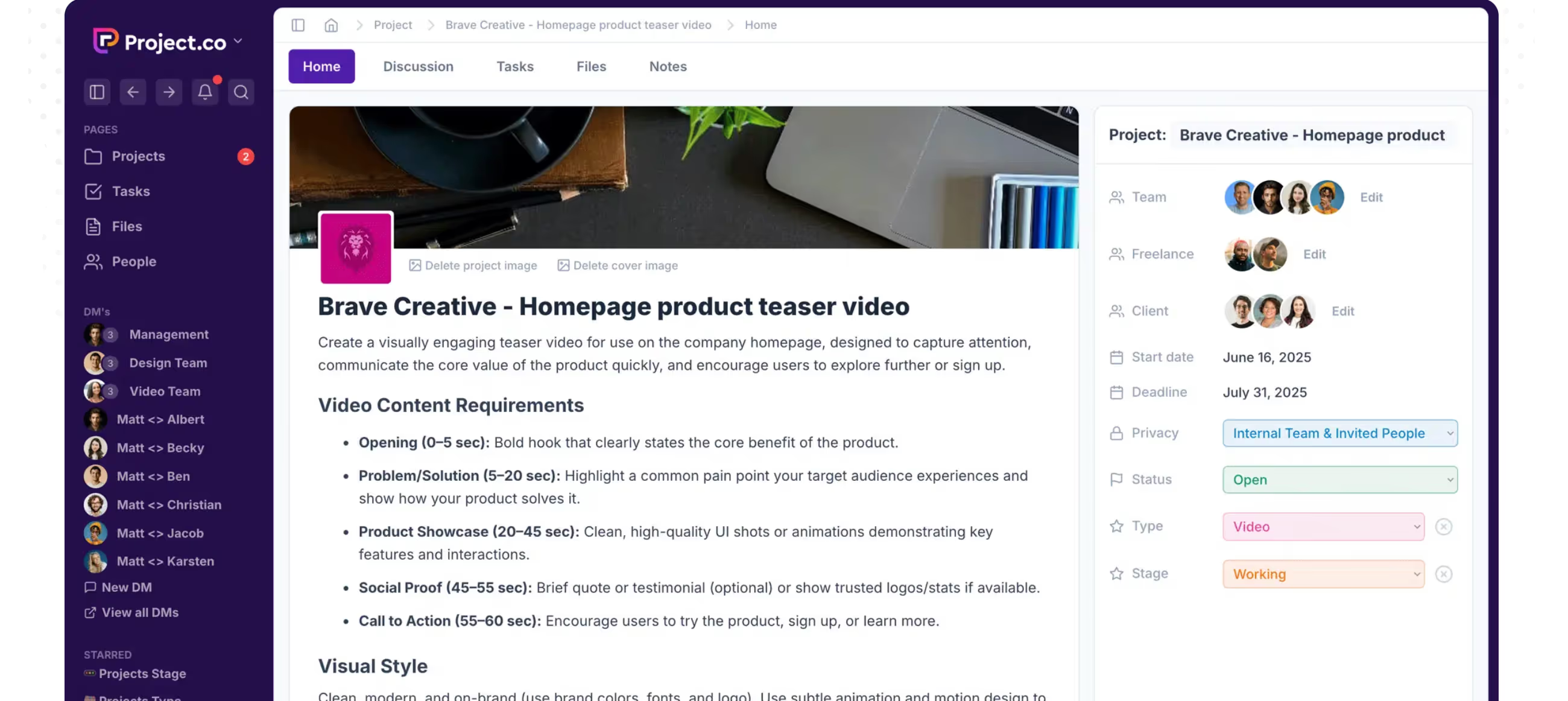
Project.co organizes each project like a social media profile with tabs: Tasks, Discussions, Files, Notes, Payments. It's intuitive if you've used Facebook—probably why clients don't need training.
Setup Takes Minutes, Not Days
Create a project, add your team and client contacts (remember: clients are always free), set up task lists or Kanban boards, upload brand assets if you're on Business plan. The 14-day trial gives you full Business plan access, and you won't lose access after it ends—your data just becomes read-only until you subscribe.
Daily Workflow
Tasks live in List or Kanban views with calendar and scheduler options. Time tracking is built-in (for billing or internal tracking), discussions stay threaded to keep context, and files support per-file comment threads. Google Docs can be embedded directly.
The mobile apps exist (iOS and Android) but multiple users report they're "better for viewing than editing" with a 3.0/5 iOS rating. If your team lives in mobile, that's a problem. Last update was January 2023—mobile clearly isn't the development priority.
⏻ Core Features & Capabilities
Project.co covers the basics well and doesn't pretend to do more.
✔ Client Management That Works
The client portal isn't a tacked-on feature—it's the whole point. Clients see a branded dashboard with their projects, tasks assigned to them, files shared with them, and nothing else. No confusing workspace switchers, no accidental access to other clients' data.
Permissions let you control what clients see at the task level. Mark tasks as client-visible or internal-only. Time entries can be hidden while still tracking hours for invoicing. One agency owner: "Each client has their own project with branded images and banners. It's like they have their own mini portal."
✔ The Features They Didn't Build
Here's what Project.co doesn't have: native integrations beyond Stripe/Google SSO, public API for custom integrations, task dependencies or Gantt charts, advanced reporting or profitability tracking, capacity planning or workload views, two-factor authentication (it's "on the roadmap"), and robust mobile apps.
For agencies tracking utilization or project margins, tools like Teamwork offer substantially more. Everything else requires Zapier (which adds $20-100/month to your costs).
✔ Time Tracking & Payments
Built-in timers let you track billable hours on tasks. The Stripe integration handles payments, but it's basic—send invoices, track payment status. If you need sophisticated billing with recurring subscriptions or complex pricing, you'll want dedicated tools like HoneyBook or Dubsado.
🚀 Quick Win: Start with 3-5 client projects during the trial. Watch if clients actually log in and engage. That's your real test—not the feature list, but actual client adoption.
⍟ The Verdict: Our Assessment
Overall Rating: 7.8/10. Recommended for service businesses where client experience trumps advanced features.
Project.co succeeds at its specific mission: making project management approachable for clients. The rating reflect genuine satisfaction from teams who value simplicity and client engagement over feature depth.
Bottom Line: Choose Project.co when client adoption matters more than feature count, and you're managing 1-25 team members with straightforward projects. Skip it if you need complex workflows, deep integrations, or enterprise security.
✩ What Users Say: Reviews & Ratings
User ratings: 4.7/5 on Capterra (140+ reviews), 4.3/5 on G2 (58 reviews), 2.5/5 on Trustpilot (6 reviews, mostly angry V2 LTD holders).
✔ Pros: What Users Love
- Client Actually Use It: Clean interface that doesn't intimidate non-technical clients—they log in without constant reminders.
- Fast Onboarding: 20-minute setup time means you're billing clients faster, not training teams on complex software.
- White-Label at Reasonable Price: $15/user/month for custom domain and branding beats competitors charging $30-50/user.
- Unlimited Client Seats: Add 50 clients or 500—doesn't affect your bill, unlike competitors that charge per client.
✗ Cons: Common Complaints
- Integration Desert: Stripe and Google SSO. That's it. Everything else needs Zapier, which adds monthly costs.
- Basic Reporting: Can't track profitability, utilization, or build custom dashboards—deal-breaker for data-driven agencies.
- Mobile Apps Are Weak: iOS rated 3.0/5, last updated January 2023, better for viewing than editing.
- No Two-Factor Authentication: Security-conscious teams can't use it until 2FA ships (been "on roadmap" for months).
⚠ 3 Critical Mistakes to Avoid
Mistake #1: Assuming Business Plan Features Work on Starter
The Problem: An agency signed up for Starter plan ($10/user/month) expecting white-label branding. That's Business plan only ($15/user/month). They pitched 3 clients on their "branded portal," then had to explain why clients saw Project.co branding everywhere.
The Cost: Credibility hit with new clients, emergency upgrade mid-project, and $300 extra annually (5 users × $5/month × 12 months) they hadn't budgeted. Plus the embarrassment.
⚡ How to Avoid It: White-label, custom domain, freelancer management, and unlimited custom fields live on Business plan only. If client branding matters, budget $15/user/month. The free trial gives you Business access—test the features you actually need before committing.
Mistake #2: Ignoring the Integration Limitations
The Problem: Teams assume "project management tool" means it connects to their existing stack—accounting software, CRM, email marketing, Slack. Project.co integrates with Stripe, Google SSO, and basically nothing else natively. One agency spent $600 annually on Zapier to connect 5 essential tools.
The Cost: Hidden Zapier costs: $240-$1,200/year depending on automation volume. Plus 2-3 hours monthly maintaining Zaps when they break. Total first-year cost: $840-$1,560 you didn't plan for.
⚡ How to Avoid It: Map your integration needs before buying. List every tool you need connected (accounting, CRM, time tracking, Slack). Check if Zapier supports them and calculate costs. If you need 5+ integrations, consider Teamwork or Monday.com with native connectors. If you need fewer than 3, Project.co + Zapier might still be cheaper.
Mistake #3: The V3 Migration Trap for LTD Holders
The Problem: If you bought a Project.co lifetime deal through AppSumo, you're on V2. V3 launched in 2025 as essentially a new product with different codebase. LTD holders don't get V3 access—they must pay new subscriptions. V2 still works but receives minimal support.
The Cost: You paid $49-$149 for "lifetime access" that became legacy software within 2-3 years. Migrating to V3 means $120-$180/year ongoing for a solo user, more for teams. The Trustpilot 2.5/5 rating comes from angry LTD holders facing this reality.
⚡ How to Avoid It: If you're buying now, this doesn't affect you—new customers get V3 subscriptions. But it signals something: the company isn't afraid to sunset legacy customers for business reasons. If you're risk-averse about vendor stability, consider established alternatives like Basecamp (20+ years operating) or Asana (publicly traded, clear roadmap).
FAQ
How quickly can we get started with Project.co?
Most users report being productive within 20 minutes. The interface is intuitive enough that clients need zero training. For team setup, expect 1-2 hours to configure branding (Business plan), set up your first few projects, and establish workflows. The 14-day trial gives full access to test everything.
What's included in the pricing?
Starter ($10/user/month): Unlimited projects, tasks, clients (free), 10GB storage per user, all task views, time tracking, basic features. Business ($15/user/month): Everything in Starter plus white-label branding, custom domain, 50GB storage per user, unlimited custom fields, granular permissions. Annual billing only.
Can clients really use it for free?
Yes. Every plan includes unlimited free client seats. Clients can view tasks, comment, upload files, approve work—full collaboration. You only pay for your internal team members. This is Project.co's biggest competitive advantage over tools that charge per client seat.
How does Project.co compare to Basecamp?
Both target client work, but different approaches. Basecamp: Flat $99/month unlimited users (better at 10+ person teams), stronger message boards, 20+ year track record. Project.co: Per-user pricing better for small teams (1-5 people), better task management, white-label branding. Choose Basecamp for team size, Project.co for task features and branding.
Is my data secure without 2FA?
Project.co runs on Bubble.io infrastructure (AWS us-east-1), inheriting SOC 1/2/3 and ISO 27001 from AWS—but Project.co itself holds no independent security certifications. Two-factor authentication is on the roadmap but not available yet. For compliance-heavy industries (healthcare, finance), this is often a dealbreaker.
What if we need more advanced features later?
Project.co intentionally stays simple. If you outgrow it, migration paths exist to Teamwork (similar client focus, more features), Wrike (enterprise power), or Monday.com (middle ground). Export your data as CSV before canceling. Most agencies migrate after 2-3 years when project complexity outpaces Project.co's capabilities.
Suggestly
Find your best-fit B2B tool in 90 seconds
✓ Free personalized recommendations
✓ Based on YOUR business needs
✓ No signup required

Project.co




