

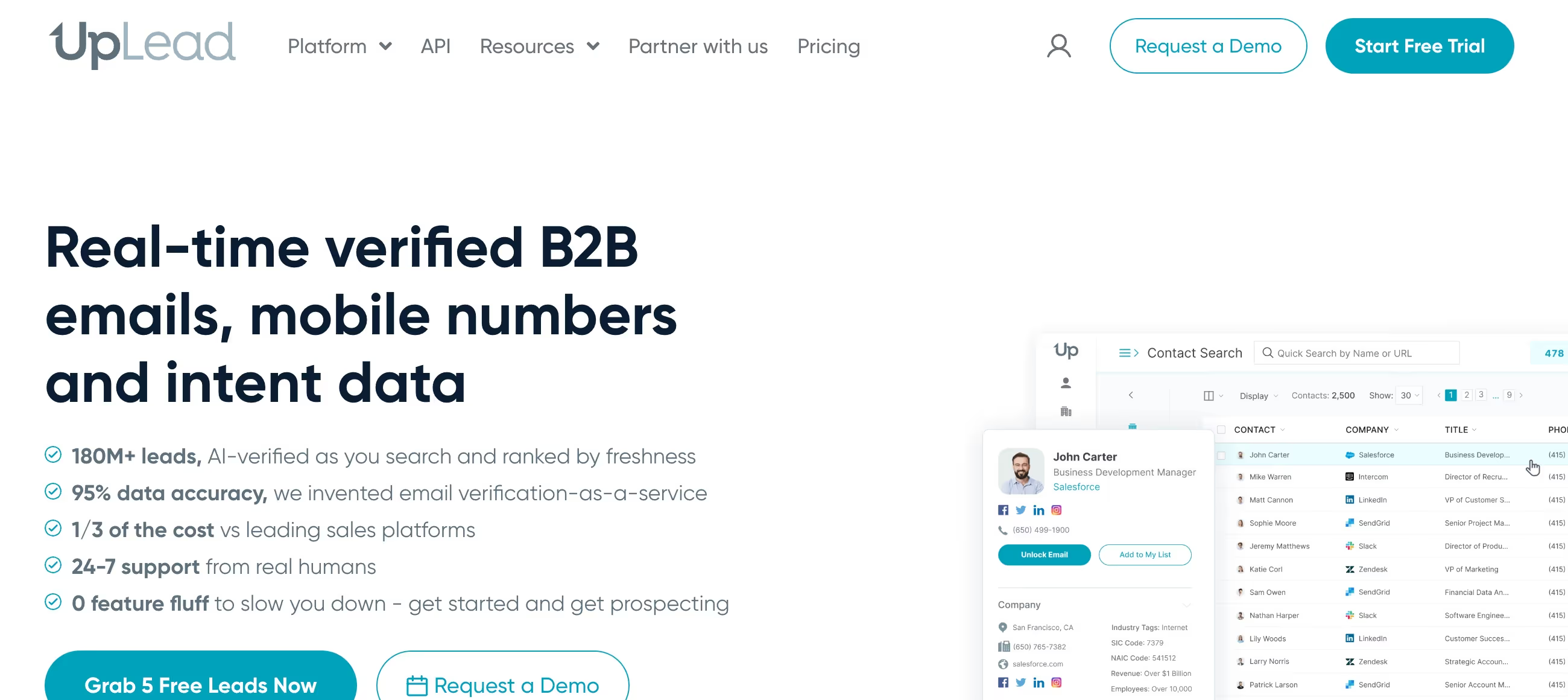
✨ Is UpLead Right for You?
What it is: B2B contact database with real-time email verification that charges credits only for verified contacts.
Best for: SMB sales teams who need accurate email data without ZoomInfo's $15K+ price tag, especially if you're prospecting in North America.
Main limitation: The Essentials plan's 170 monthly credits run out faster than you'd think (each contact = 1 credit), and there's no self-service cancellation—you schedule a Zoom call to quit.
Get it if: You're tired of bounce rates killing your sender reputation and need verified emails at one-third the cost of enterprise platforms.
Skip it if: You need massive contact volume for global prospecting or require extensive APAC/EMEA coverage beyond major companies.
🎯 Why UpLead?
Your email bounce rate is murdering your campaigns. Every bad email tanks your sender reputation, lands you in spam, and wastes hours of follow-up effort. UpLead verifies contacts before they hit your list, not after.
💰 Real-Time Verification That Actually Works
95% accuracy guarantee, and they mean it. Email gets verified the instant you download it—if it bounces, you get your credit back. Compare that to pulling lists from stale databases where 20-30% bounce rates are normal.
The math works: one bad campaign with 500 bounces can blacklist your domain. UpLead stops that upfront.
🔍 Search That Gets Specific
50+ filters let you drill down: industry, company size, job title, revenue, tech stack, even intent signals showing who's actively searching for solutions like yours. Want "marketing directors at 50-200 person SaaS companies using HubSpot in California"? Done in 30 seconds.
💵 The ZoomInfo Alternative
ZoomInfo starts at $15,000 annually with forced multi-year contracts. UpLead? $74-$199 monthly with no annual commitment on lower tiers. For teams doing targeted outbound without enterprise budgets, that's the difference between "we can afford this" and "hard pass."

✎ What UpLead Users Typically Achieve
Sales teams using UpLead report 80%+ email reply rates from verified contacts, 95%+ data accuracy eliminating wasted outreach, and new revenue from targeted prospecting lists.
One agency user noted gaining 7 new clients in 6 months. Another team reported $1M+ in new revenue attributed directly to UpLead's targeted contact data.
The catch? Results depend on how targeted you get with filters. Spray-and-pray approaches waste credits fast. Teams that layer 5-8 specific filters (industry + job title + company size + tech stack) see dramatically better conversion than broad searches.
💡 Pro Tip: Use intent data filters to find prospects actively searching for your solution category. These warm leads convert 3-5x better than cold outreach to random contacts in your target industry.
🛠 How UpLead Works
Setup takes 20 minutes, not days. Create account, connect your CRM (Salesforce, HubSpot, Pipedrive—all native), set search filters, export contacts. The Chrome extension grabs LinkedIn profiles directly into your dashboard.
Building Your First List
You layer filters to narrow down prospects: choose industry, set company size parameters, add job titles, filter by technologies they use. UpLead shows how many contacts match before you spend credits. When you're ready, download and the real-time verification runs—invalid emails get flagged immediately and don't cost you.
Each contact costs 1 credit and includes verified email plus direct dial when available. The 170-credit Essentials plan handles about 5-6 targeted lists monthly if you're strategic.
The Daily Workflow
Most teams use UpLead for building weekly prospecting lists, enriching incomplete CRM data, and verifying contacts before campaigns launch. The data enrichment feature fills gaps when you upload partial contact lists—names and company domains become complete records with emails and phone numbers.
⚡ Core Features & Capabilities
The platform does four things really well: find contacts, verify emails, enrich data, and integrate with your stack. Here's what matters.
✔ Real-Time Email Verification
This is the standout feature. Every email gets checked live—syntax validation, domain verification, mailbox existence—before download. Invalid addresses don't consume credits. You're paying only for contacts that actually work, which is rare in this space.
✔ Intent Data & Technographics
See which companies are actively researching your category through intent signals. Track what technologies prospects use—CRM platforms, marketing tools, infrastructure. Filter prospects by "uses Salesforce" or "recently searched for email marketing solutions" to find warmer leads.
✔ Chrome Extension
Browse LinkedIn or company websites, click the extension, instantly pull contact data into UpLead. Saves hours of manual research when you're targeting specific accounts.
✔ CRM Sync
Native integrations with Salesforce, HubSpot, Zoho, Pipedrive, and 1,500+ apps via Zapier. Export contacts directly into your CRM workflows without CSV gymnastics.
🚀 Quick Win: Start with your ideal customer profile's exact parameters, build one highly targeted 50-contact list, test campaign performance before scaling. Better to nail targeting with fewer credits than spray-and-pray with all 170.
⍟ The Verdict: Our Assessment
Overall Rating: 8.4/10 — Solid choice for SMB teams who prioritize email accuracy over database size and want transparent pricing without enterprise commitment.
UpLead nails the core problem: giving you verified contacts that actually work. The real-time verification delivers on its promise, costs are clear upfront, and setup is genuinely fast. You're trading database breadth for data quality.
Bottom Line: Choose UpLead when email deliverability is your priority and you need accurate data without enterprise pricing. Consider alternatives if you need massive contact volumes for global prospecting or prefer unlimited plans.
✩ What Users Say: Reviews & Ratings
User ratings: 4.7/5 on G2 (800+ reviews), 4.6/5 on Capterra (76 reviews), 4.1/5 on Trustpilot (73 reviews).
✔ Pros: What Users Love
- Email Accuracy: Bounce rates under 5% are common. Users consistently praise the real-time verification as a game-changer for sender reputation.
- Affordable Alternative: Teams switching from ZoomInfo save $10K+ annually while maintaining data quality for core prospecting needs.
- Intuitive Search: The 50+ filters make building targeted lists fast—users report going from search to export in under 10 minutes.
- Clean Interface: New users are productive within an hour. No training needed, which matters for lean teams.
✗ Cons: Common Complaints
- Credit Limits Feel Tight: 170 monthly credits on Essentials run out faster than expected for high-volume prospecting. Additional credits cost more per contact.
- No Self-Service Cancellation: You must schedule a Zoom call to cancel, which frustrates users who prefer clicking "cancel subscription."
- Phone Accuracy Lags Email: Direct dial numbers are less reliable than email addresses—some users report outdated or incorrect phone data.
- Auto-Renewal Surprises: Several reviewers mention unexpected annual charges without clear renewal warnings, though support typically refunds when contacted.
⚠ 3 Critical Mistakes to Avoid
Mistake #1: Not Monitoring Credit Burn Rate
The Problem: You pull broad lists without checking how many credits remain, hit your limit mid-campaign, then face unexpected charges for additional credits at premium rates (typically 25-40% more per contact than your plan's base rate).
The Cost: Running out of credits during a time-sensitive campaign means either paying premium rates or pausing outreach. One user reported burning 170 credits in week one, then paying $200 for 100 additional credits at $2 each versus $0.58 per credit on their plan.
⚡ How to Avoid It: Track credits weekly. Before pulling a list, UpLead shows how many contacts match your filters—check that against remaining credits. Build smaller, highly targeted lists (30-50 contacts) instead of downloading 170 contacts at once. Save credits for your highest-probability prospects.
Mistake #2: Assuming Phone Numbers Match Email Accuracy
The Problem: UpLead's phone data is less accurate than email verification. Users report 10-20% of direct dials are outdated or wrong, especially for smaller companies or roles that change frequently.
The Cost: Wasted time calling disconnected numbers or reaching wrong people damages your brand ("How did you get this number?"). Sales teams report spending 2-3 hours weekly chasing bad phone data.
⚡ How to Avoid It: Prioritize email outreach where UpLead's verification shines. Use phone data as secondary contact method, not primary. For phone-heavy prospecting, consider tools specializing in phone intelligence or verify numbers through LinkedIn before calling.
Mistake #3: Forgetting Renewal Timing
The Problem: Annual plans charge upfront without clear renewal warnings. Several users report surprise charges when they forgot their annual renewal date, especially frustrating if usage dropped mid-year.
The Cost: One user faced an unexpected $890 annual charge 3 months after their free trial ended. While UpLead typically refunds when contacted, dealing with surprise charges and disputes wastes time and creates cash flow headaches.
⚡ How to Avoid It: Set calendar reminders for 30 and 7 days before renewal dates. If you're testing UpLead, start with monthly billing despite the higher per-credit cost—better to pay 25% more monthly than commit annually before validating ROI. Review usage monthly to catch declining value before auto-renewal hits.
FAQ
How fast can I get started with UpLead?
Setup takes about 20 minutes. Create your account, connect your CRM if desired, set up search filters, and you're pulling verified contacts. The interface is intuitive enough that most users are productive within their first hour. The Chrome extension installs in seconds for grabbing LinkedIn profiles.
What happens when I run out of credits?
You can purchase additional credits, but they cost 25-40% more per contact than your plan's base rate. On the Essentials plan, your 170 credits average $0.58 each, but additional credits typically run $1.50-$2 per contact. Better to upgrade to the Plus plan ($199/month for 400 credits) if you're consistently hitting limits.
How does UpLead compare to ZoomInfo?
UpLead costs one-third of ZoomInfo ($74-$199 monthly vs. $15,000+ annually) with comparable email accuracy but a smaller database. ZoomInfo offers deeper firmographics and better global coverage, especially for enterprise contacts. UpLead wins on transparency, affordability, and email verification. Choose ZoomInfo for comprehensive enterprise intelligence, UpLead for targeted email prospecting on an SMB budget.
Can I cancel my subscription easily?
Not entirely. UpLead requires scheduling a Zoom call to cancel—there's no self-service cancellation button. This frustrates users who prefer one-click cancellations. Monthly plans don't lock you in beyond the current month, but expect a 15-minute call with their retention team when you're ready to quit.
Is the data accurate outside North America?
UpLead's database covers 200+ countries, but accuracy drops significantly outside North America, especially for APAC and EMEA regions beyond major multinational companies. For U.S. and Canadian prospecting, the 95% email accuracy holds up. For global prospecting, expect more gaps in coverage and older data for smaller international companies.
Do unused credits roll over?
On monthly plans, no. Credits expire at month-end. Annual plans give you all credits upfront (2,040 for Essentials, 4,800 for Plus), but they don't carry past the 12-month period. If you need flexibility, monthly billing makes sense despite higher per-credit costs. If you'll use credits consistently, annual saves about 25%.
Suggestly
Find your best-fit B2B tool in 90 seconds
✓ Free personalized recommendations
✓ Based on YOUR business needs
✓ No signup required

UpLead




